
Top 6 Research Methods for UX Competitor Analysis
Six practical UX research methods—heuristic reviews, feature matrices, task-flow analysis, benchmarking, review mining, and comparative testing—to spot UX gaps in SaaS.

When users interact with your SaaS product, their expectations are often shaped by competitors. Falling short can cost you conversions - 88% of users abandon apps after one bad experience. To stay ahead, competitor analysis is a must. Here are six proven methods to evaluate and improve your UX:
- Heuristic Evaluation: Identify usability issues using established design principles.
- Feature Comparison Matrix: Compare specific features across competitors to find gaps and trends.
- Task-Flow Analysis: Map user journeys to pinpoint friction points and inefficiencies.
- UX Benchmarking: Measure performance metrics like task completion time against competitors.
- User Review Mining: Analyze feedback from platforms like G2 or app stores to uncover pain points.
- Comparative Usability Testing: Observe users completing tasks on your site vs. competitors to highlight strengths and weaknesses.
These methods help you refine workflows, align with user expectations, and outperform competitors. For a quick summary, see the comparison table below.
Quick Comparison
| Method | Time Required | Cost | Key Use |
|---|---|---|---|
| Heuristic Evaluation | 45–90 mins/site | Low | Spot usability issues early |
| Feature Comparison Matrix | Low to Medium | Low | Identify gaps and must-have features |
| Task-Flow Analysis | Medium | Medium | Improve complex user workflows |
| UX Benchmarking | High (long-term) | High | Track performance against competitors |
| User Review Mining | Medium | Low | Understand user frustrations and needs |
| Comparative Usability Testing | High | High | Validate designs with real user input |
Investing in UX research can yield a $100 return for every $1 spent. Start with low-cost methods like heuristic evaluation and user review mining, then scale up to more detailed testing as resources allow.
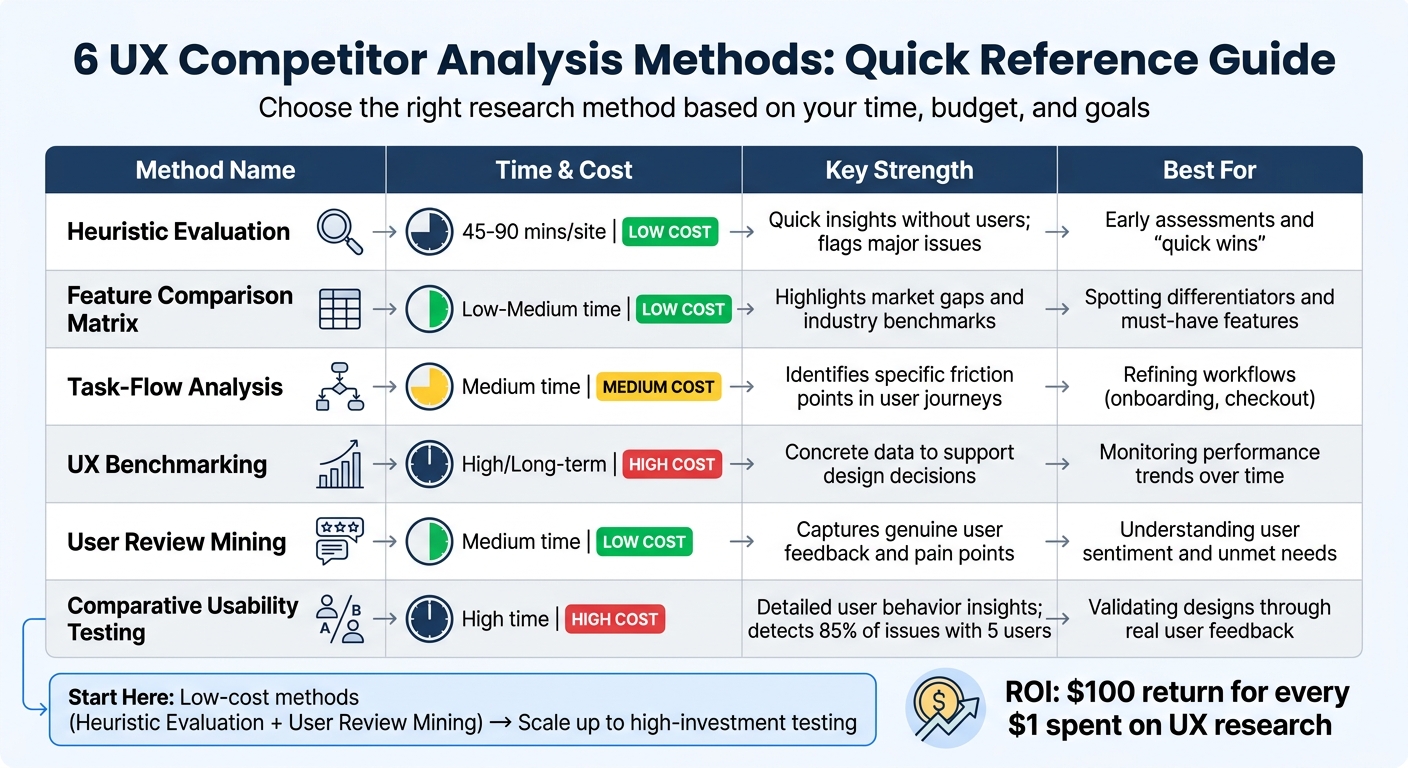
UX Competitor Analysis Methods Comparison: Time, Cost, and Use Cases
How to Conduct a Competitive Usability Evaluation
sbb-itb-0a8c96a
1. Heuristic Evaluation
Heuristic evaluation involves usability experts assessing competitor websites based on established design principles, such as Nielsen and Molich's 10 User Interface Design Heuristics. These principles cover areas like "visibility of system status", "user control and freedom", and "error prevention." Instead of guessing what works, evaluators systematically score competitor sites against these guidelines, documenting problems with screenshots and assigning severity ratings. Let’s explore how this method uncovers UX gaps, delivers practical insights, and improves SaaS workflows.
Identifies UX Gaps
When applied to SaaS competitor research, heuristic evaluation is particularly effective at revealing gaps in user experience - areas where competitors consistently fall short. For instance, while analyzing checkout flows, you might notice that none of your competitors offer a guest purchase option, pointing to an opportunity to streamline the process. Similarly, issues like inaccessible keyboard navigation or poorly labeled actions are often uncovered. By evaluating multiple competitors, you can identify common shortcomings across the industry.
"Heuristics are these rules of thumb based on good practice and known problems in design." - William Hudson, Interaction Design Foundation
Offers Actionable Insights
This evaluation method doesn’t just identify problems - it prioritizes them. Evaluators assign severity ratings to issues, categorizing them as quick fixes, baseline requirements, or potential differentiators. For SaaS products, this might mean pinpointing features like bulk editing checkboxes as a competitive advantage or recognizing the absence of tools, such as team capacity visualizations, among competitors.
Supports SaaS UX Optimization
Heuristic evaluation is especially helpful for refining workflows critical to conversions, such as trial signups, feature discovery, and multi-level navigation. Each evaluation typically takes 45 to 90 minutes per competitor, with teams of three to five evaluators helping to minimize bias. To maintain relevance, the entire process should be completed in one to two weeks. However, it’s worth noting that 43% of issues flagged during heuristic evaluations might be "false alarms" when compared to actual user testing. For this reason, it’s essential to validate findings with quick usability tests involving real users.
2. Feature Comparison Matrix
A feature comparison matrix provides a detailed side-by-side analysis of specific functionalities after analyzing a competitor's website through a heuristic evaluation. This structured table outlines competitors' features and their implementations. While heuristic evaluation focuses on overarching usability principles, the matrix zeroes in on comparing features across 3–5 direct competitors and 1–2 indirect competitors, offering a more granular perspective.
Identifies UX Gaps
This matrix is a powerful tool for spotting three types of UX gaps. First, it highlights opportunities by showing how competitors implement features - like the absence of bulk-action checkboxes. Second, it uncovers market gaps, such as missing accessibility options or advanced filtering features that cater to underserved user groups. Lastly, it identifies areas where industry standards have already been established.
"Users spend most of their time on other sites. Users prefer your site to work the same way most of the internet does."
Offers Actionable Insights
By analyzing both the presence and execution of features, the matrix helps ground design decisions in clear, objective data. For example, comparing navigation designs - Monday.com's top horizontal layout, Asana's left sidebar, and Trello's top horizontal approach - can reveal a divided trend, hinting at opportunities for differentiation. Insights from the matrix are typically grouped into four actionable categories:
- Quick wins: High impact, low effort changes.
- Required standards: Features users expect as a baseline.
- Differentiators: Unique elements that set a product apart.
- Future innovations: Features that could lead the market.
These categories guide improvements in key SaaS workflows.
Supports SaaS UX Optimization
For SaaS platforms, the matrix should focus on evaluating critical workflows like trial sign-up processes, feature discovery, and integration options. Emphasis on high-impact pages ensures meaningful UX insights. Documenting specifics - such as the number of clicks required, label clarity, or points where users hesitate - helps create a thorough understanding of the user experience. Including your own platform in the analysis can also reveal overlooked weaknesses. By complementing heuristic evaluations, this method provides actionable, feature-specific insights to refine and enhance UX strategies.
3. Task-Flow Analysis
Task-flow analysis examines the steps users take to complete key actions on a competitor's website - like signing up for a trial or creating an account. Unlike heuristic evaluation, which checks interface quality against usability principles, task-flow analysis focuses on the efficiency and structure of the process itself. By tracking clicks, decision points, and moments of hesitation or backtracking, this approach pinpoints friction points that slow users down.
Identifies UX Gaps
Mapping out competitor workflows side-by-side helps reveal gaps in meeting user needs. For instance, analyzing the onboarding flow of multiple project management tools might show that completing a task requires too many steps. This insight highlights opportunities to simplify processes. These comparisons not only uncover common patterns users expect but also spotlight areas where you can stand out.
Offers Actionable Insights
Recording user sessions - using tools like Loom - captures moments of confusion that static screenshots might miss. To create a clear baseline, benchmark specific metrics such as the number of steps, total clicks, and time-to-completion across 3–5 competitors. This data can guide quick improvements, like reducing form fields or improving button visibility. Keep the analysis timeframe short - around one to two weeks - to ensure the results reflect current market conditions.
Supports SaaS UX Optimization
For SaaS products, focus on features that power users rely on, such as bulk editing or workload visualization. Even small improvements here can lead to higher retention rates. Measuring "time-to-value" - how quickly a competitor helps users achieve their first success - can offer ideas to speed up your own user journey. With 74% of consumers citing experiences as a key factor in purchasing decisions, refining these flows directly impacts business outcomes like reducing churn and driving feature adoption. Teams that prioritize continuous discovery and regularly test workflows release updates twice as fast and achieve 30% higher adoption rates. This detailed mapping of user journeys lays a strong foundation for deeper evaluations like UX Benchmarking.
4. UX Benchmarking
UX benchmarking is all about measuring how your product performs compared to competitors by testing the same tasks under controlled conditions. For example, you might think a three-minute checkout process is fast - until you realize competitors are doing it in 90 seconds. This method helps differentiate between industry standards and areas where you can truly stand out. It also complements other techniques like heuristic evaluations and task-flow analysis by adding objective data to the mix.
Identifies UX Gaps
Benchmarking focuses on hard numbers, building on qualitative insights from earlier methods. It can reveal gaps in the market where competitors aren’t fully addressing user needs. For SaaS platforms, this might involve examining trial signup processes, how users discover features, or the complexity of essential workflows. By tracking metrics like task success rates, error frequency, and the number of steps needed to complete tasks, you can see if your site is ahead, on par, or lagging behind competitors. Some professional UX audits even compare against as many as 123 top-performing industry leaders to set a competitive baseline. Plus, since users are constantly interacting with other websites, they expect your platform to meet similar standards - benchmarking helps identify where expectations aren’t being met.
Offers Actionable Insights
This method provides data-driven clarity. For instance, usability testing with just five users can uncover about 85% of usability issues, giving you a clear roadmap for improvements. By standardizing tasks and randomizing their order, you ensure fair, unbiased results. To keep things focused, limiting research to a two- or three-week window can prevent overanalyzing while ensuring the data reflects current market conditions.
Supports SaaS UX Optimization
For SaaS websites, benchmarking delivers measurable insights into critical factors like page load times, mobile usability, and accessibility compliance. Even a 1-second delay in loading can reduce conversion rates by 7%, highlighting the importance of technical performance. Conducting UX reviews regularly - every six to 12 months - helps you stay ahead of changing design trends and competitor strategies. Using the same criteria to evaluate your site as you do for competitors can also reduce internal biases. Tools like the Competitor Analysis Tool (https://competitorscan.io) make this process faster by identifying gaps in demand, messaging, and visibility in just two minutes. This allows you to prioritize growth opportunities without needing deep SEO expertise. Benchmarking ties together subjective evaluations and user behavior metrics, creating a well-rounded picture of where your product stands in the market.
5. User Review Mining
User review mining involves analyzing feedback from platforms like G2, Capterra, app stores, and social media to identify competitor weaknesses and uncover opportunities for improvement. These reviews provide raw, unfiltered insights into user experiences that researchers - who may not represent the target audience - might otherwise miss. Marilyn Wilkinson, a digital marketing strategist at UXCam, emphasizes this point: "Examine user feedback... Read user reviews and ratings in app stores to gain insights into user opinions, pain points, and feature requests".
Identifies UX Gaps
User reviews often highlight usability issues that traditional analyses might overlook. For example, recurring complaints about confusing navigation, hidden settings, or overly complex workflows can reveal where competitors fall short. Specific grievances, such as trouble importing data or dissatisfaction with mobile responsiveness, point directly to areas where your SaaS product can stand out. This is especially critical since 52% of users say a poor mobile experience makes them less likely to engage with a brand. Tracking these mobile-related frustrations can provide a roadmap for improving your product’s user experience.
Offers Actionable Insights
Detailed review analysis uncovers exactly what’s not working and why. Take the example of Spread Group: in 2026, the clothing company studied competitor reviews that accused them of "greenwashing." By responding with clearer labeling and detailed product information, they boosted organic product sales by 20%. Similarly, ADT used competitor feedback to discover that users were frustrated by motion detectors being triggered by leaves, leading to direct improvements in their app’s functionality. Comments about users feeling lost, needing to backtrack, or struggling with unclear instructions are goldmines for actionable UX improvements.
Supports SaaS UX Optimization
For SaaS companies, review mining is a powerful tool for refining onboarding processes and addressing feature adoption challenges. Instead of guessing which features to prioritize, user feedback provides a clear direction for your product roadmap. Reviews also validate findings from other research methods, confirming issues in areas like trial signups, checkout flows, or account setup. AI-powered tools can speed up the analysis process by up to 80%, making it easier to identify and address user frustrations. Platforms like an AI SEO Competitive Analyzer can help consolidate these insights, ensuring feedback translates into meaningful UX improvements.
6. Comparative Usability Testing
Comparative usability testing, often called "bake-offs", involves observing real users as they complete the same tasks on your SaaS platform and your competitors' websites. This approach adds a quantitative layer to methods like heuristic evaluations, feature comparisons, and task flow analysis. By focusing on actual user behavior, it highlights where your product creates friction compared to others. Tasks such as trial signups, feature searches, or data exports are ideal for identifying specific pain points.
Identifies UX Gaps
Metrics like task completion rates, time-on-task, and error counts can pinpoint where your platform falls short. For example, if users take 90 seconds to complete a task on a competitor's site but 180 seconds on yours, that’s a 50% efficiency gap that needs addressing. Research by the Nielsen Norman Group shows that testing with just five users can uncover around 85% of usability issues during moderated sessions. Using "think-aloud" protocols during these tests further reveals mismatches between user expectations - often shaped by experiences on other platforms - and your interface design. These findings provide a solid foundation for targeted improvements.
Offers Actionable Insights
This method allows you to treat competitors' live products as free prototypes, offering valuable lessons without the need for upfront development. For instance, in 2021, ADT analyzed competitor mobile apps and discovered pain points like motion detectors being triggered by falling leaves. These insights directly influenced improvements to their own app. To ensure unbiased results, rotate the testing order of sites and recruit users familiar with rival products. This helps uncover what they find helpful or frustrating.
Supports SaaS UX Optimization
By addressing the gaps and leveraging the insights gained, comparative usability testing becomes a powerful tool for refining key SaaS workflows. For B2B SaaS companies, this often means focusing on high-value areas like trial signup processes, feature discovery, and data exports. Studies show that every $1 invested in UX research can yield a $100 return, making this approach a cost-effective way to reduce development risks. Organizing findings into categories like "quick wins" (high impact, low effort), "required standards" (expected features), and "differentiators" (unique strengths) provides a clear roadmap for improvement. Additionally, this method can reveal unmet needs - opportunities no competitor has addressed yet - offering a chance to stand out in the market.
Comparison Table
Here's a quick side-by-side breakdown of various research methods, highlighting their time requirements, costs, strengths, and ideal use cases.
| Research Method | Time Required | Relative Cost | Key Strengths | Best For |
|---|---|---|---|---|
| Heuristic Evaluation | Around 45–90 mins per site | Low | Delivers quick insights without user involvement; flags major issues | Early assessments and identifying "quick wins" |
| Feature Comparison Matrix | Low to Medium | Low | Highlights market gaps and industry benchmarks | Spotting differentiators and must-have features |
| Task-Flow Analysis | Medium | Medium | Identifies specific friction points in user journeys | Refining workflows like onboarding or checkout |
| UX Benchmarking | High (Long-term) | High | Offers concrete data to support design decisions | Monitoring performance trends over time |
| User Review Mining | Medium | Low | Captures genuine user feedback and pain points | Understanding user sentiment and unmet needs |
| Comparative Usability Testing | High | High | Provides detailed user behavior insights; detects 85% of issues with just 5 users | Validating designs through real user feedback |
If you're working with limited resources, Heuristic Evaluation and User Review Mining are excellent starting points - they're quick, affordable, and can reveal actionable insights early on. On the other hand, Comparative Usability Testing offers the most in-depth understanding of user behavior but requires a bigger investment in both time and participant recruitment.
"Expert reviews deliver rapid insights at low cost, making it ideal for initial competitive assessment." - HubSpot
Conclusion
These six methods turn subjective debates into decisions backed by data. By spotting market gaps, cutting down friction points, and setting clear performance benchmarks, you can create a SaaS website that not only meets but surpasses user expectations. For instance, in 2025, Kommunicate achieved a 37.5% increase in feature adoption and a 3% boost in expansion MRR within just seven months by fine-tuning their onboarding flow using competitive insights.
That said, applying these methods takes time and resources - something smaller teams often lack. Conducting manual UX competitor analysis can take anywhere from 45 to 90 minutes per site, which can be a heavy burden for limited teams.
This is where the Competitor Analysis Tool changes the game. It provides actionable insights in less than 2 minutes, cutting out the need for weeks of manual data collection. The tool highlights demand, messaging, and visibility gaps without requiring any SEO expertise, freeing up your time to focus on execution instead of tedious research.
"Design debates often devolve into subjective preference battles. Competitive analysis insights replace options with evidence." - HubSpot
Whether you're aiming for quick wins or planning long-term UX enhancements, blending these research methods with tools for fast, automated insights keeps you ahead in the ever-evolving SaaS landscape. Combining user-focused strategies with efficient tools like this ensures you consistently outpace the competition. Give it a try today and see how your website stacks up!
FAQs
Which UX competitor research method should I start with on a small budget?
If you’re working with a tight budget, a smart starting point is to analyze 3–5 competitors' websites. Use free or inexpensive tools and templates to evaluate their UX design, functionality, and interface. This method is cost-effective and can reveal key strengths and weaknesses, giving you actionable ideas to enhance your own website’s user experience.
How many competitor sites should I include for meaningful UX comparisons?
When conducting UX comparisons, it's ideal to focus on 3 to 5 direct competitors. This range strikes a balance - offering sufficient data to spot patterns and areas for improvement, while avoiding information overload.
How do I validate heuristic findings so I’m not fixing the wrong problems?
To ensure your heuristic findings are accurate, it's crucial to support your observations with data and user feedback. Start by conducting a competitor analysis. This helps you compare your UX with others in the market, uncover shared challenges, and detect recurring patterns. Pair these insights with usability testing and direct feedback from users to verify whether the identified issues genuinely impact their experience.
Additionally, consistently benchmarking your UX against industry standards can help you prioritize addressing real problems rather than chasing isolated cases or false positives. This approach keeps your efforts focused and effective.