
Feature Gap Analysis for SaaS PMF
Analyze gaps by buyer behavior: prioritize table-stakes and experience issues, rank by buyer impact and cost, then build, integrate, partner, or reposition.

Most feature gaps do not matter for product-market fit. I’d only act on gaps that change buying, activation, retention, or expansion.
Here’s the short version:
- I’d compare my product against 3–5 direct competitors
- I’d separate table-stakes features from decision-swaying features
- I’d score each area by coverage and workflow quality, not by feature count
- I’d map gaps to user complaints, blocked jobs, pricing friction, and support pain
- I’d rank each gap by:
- buyer impact
- build cost
- market size
- fit with product direction
- how hard it is for others to copy
- I’d choose one of four actions: build, integrate, partner, or reposition
A few points stand out from the article:
- About 66% of software sales opportunities are competitive, so missing a table-stakes item can remove you from deals early
- Review-site complaints like “too complex to set up” or “we had to use a separate tool” often point to the gaps that hit PMF
- If every competitor misses the same use case, that may point to an under-served need
- Experience problems often matter more than feature checkboxes because they affect trust, adoption, and churn
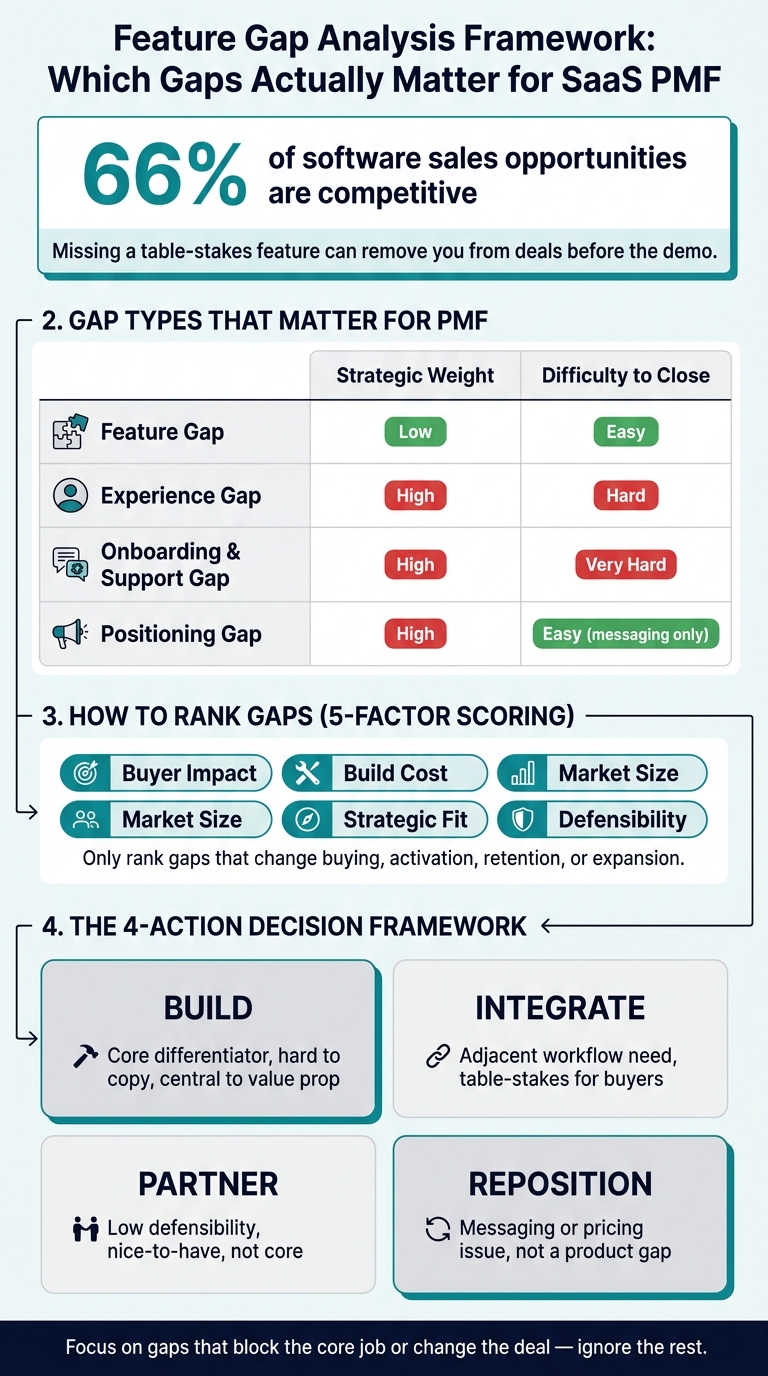
Feature Gap Analysis Framework: Which Gaps Actually Matter for SaaS PMF
How to Find a Gap in Any Market for Your SaaS AI Product
sbb-itb-0a8c96a
Quick comparison
| Area | What I’d look for | Why it matters |
|---|---|---|
| Feature coverage | Yes, No, Partial or a 4-point score | Shows parity at a glance |
| Workflow depth | Can users finish the job without help? | Tells me if the feature works in practice |
| Pricing access | Is the feature gated by plan or usage cap? | Shows sales friction and upgrade pressure |
| Onboarding and support | Can users get started on their own? | Affects activation and early churn |
| User complaints | Repeated pain in reviews and tickets | Links gaps to buyer behavior |
| Unmet needs | Problems no competitor solves | Best place to look for PMF upside |
My takeaway: feature gap analysis works best when I treat it as a buyer-behavior exercise, not a feature-list exercise. If a gap doesn’t block the core job or change the deal, I’d ignore it.
1. Your SaaS Product
Start with an internal feature baseline. Map out what your product does well, what it’s missing, and where it still falls short.
Then split features into two buckets:
- Table stakes buyers expect
- Differentiators that sway the decision
Score each feature as Yes, No, or Partial. That simple step makes competitor comparisons much more precise.
The point of this audit isn’t to stack up feature counts. It’s to find missing capabilities tied to actual workflows.
The clearest signal usually comes from workflow interviews. Watch where users hesitate, improvise, or build workarounds. That’s where the friction lives. Pair those observations with support ticket trends and win/loss notes. And be careful with loss notes: they often miss the buyer’s actual reason, which is why direct buyer interviews matter.
Put your attention on gaps that affect time saved, errors reduced, or compliance improved. Surface-level gaps rarely move PMF. Use this baseline to compare each competitor feature by feature.
2. Direct Competitor 1
Once you’ve set your internal baseline, put your first direct competitor against that same yardstick. The goal isn’t to count features like baseball cards. It’s to judge depth of coverage. Start with the same workflow your users care about most and see how well the competitor handles it.
That’s where a real gap analysis gets useful. It shows what users need but still can’t get from the other options in the market.
Check review sites for lines like "I wish it could" or "we had to use a separate tool." Those comments often point to the stuff that hurts most: activation friction, missing workflow steps, or clunky workarounds. Then run the same workflow interview on the competitor’s product so you’re comparing like for like.
Put more weight on experience gaps than feature gaps. A smoother onboarding flow or a faster path through the main job can shift PMF more than one missing toggle. Experience and service gaps tend to matter most because they shape adoption, trust, and retention.
After that, rank each gap by two things: user impact and cost to close.
| Gap Type | Strategic Weight | Difficulty to Close |
|---|---|---|
| Feature | Low | Easy |
| Experience | High | Hard |
| Onboarding and Support | High | Very Hard |
| Positioning | High | Easy (messaging only) |
| Pricing | Medium | Medium |
You can also learn a lot from job postings. They often hint at where a competitor is putting its next dollars and time. Use those signals to decide which gaps deserve roadmap attention next.
3. Direct Competitor 2
When you analyze a competitor website, figure out whether the gap is about workflow depth, not just whether a feature exists on paper. A company might say it offers "custom reporting" or "team collaboration." But if a user has to submit a support ticket and then wait for someone else to build the dashboard, that’s not much of a feature. It’s a delivery gap. A three-level score helps surface that kind of partial support.
If the feature set looks close at first glance, pricing friction is often where the difference becomes obvious. Gated pricing, where you need a sales call just to get a number, can be a sign that the product isn’t set up for self-serve adoption. And that alone can push buyers to look elsewhere.
Look at the "What do you dislike?" sections on G2 and Capterra for this competitor in particular. Then search Reddit for the product name with terms like "workaround" or "frustrated." High-engagement threads often show the job the product still misses. Take those complaints, tie each one to the workflow step it blocks, and add that gap to your inventory.
4. Direct Competitor 3
Competitor 3 is the point where feature parity stops telling you much. Workflow quality starts to matter more.
Here’s the difference. A feature gap means a capability is missing. An experience gap means the feature is there, but using it still feels clunky, slow, or annoying. So even though the box is checked, buyers may not see it as a feature they can count on. Those gaps are tougher to fix because they usually call for design and workflow changes, not just more code.
Zoom is a good example. It didn’t win by inventing video calls. It won because video calls felt fast, simple, and reliable. Better workflow beat feature parity.
That’s the lens to use on Competitor 3’s core workflow. Don’t just ask whether the feature exists. Ask whether the product gets users to the outcome, or just gives them a task to complete. If a capability still needs manual setup or support help, that’s an experience gap. And that’s a spot you can use if you deliver the same outcome with less friction.
Sometimes the product itself looks strong, but a segment still doesn’t respond. In that case, the issue may be messaging rather than features. Competitor 3 may do well with enterprise accounts but miss mid-market buyers if its messaging doesn’t speak to their outcomes. Treat that as a positioning gap and fix the messaging first. If the issue slows down the workflow, it belongs on the roadmap.
5. Competitor Analysis Tool
Feature gaps are easy to list. The hard part is figuring out which ones actually matter to buyers.
That’s where Competitor Analysis Tool comes in. Instead of comparing feature lists, it looks at demand, messaging, and visibility gaps on a website. In plain English, it helps you see which gaps connect to buyer interest, not just product differences.
It can show where a competitor’s homepage clicks with a segment they’re missing, and it does that without requiring SEO know-how. Brought back to the main point of this article, the tool helps founders sort out which gaps hit demand and product-market fit most directly.
Here’s a simple example. If a competitor speaks to enterprise buyers but barely says anything to the mid-market, you may not need to build a new feature at all. You might just need to change your messaging and win that segment first. More broadly, feature gaps are easier for rivals to copy, while positioning and experience gaps are harder to replicate. That signal can help you decide whether the answer is messaging, workflow, or code.
For roadmap choices, this helps founders get past parity-first thinking. Instead of shipping matching features just to keep up, use these signals to rank the gaps buyers notice and respond to. Those are the gaps that shift buyer behavior, not ones that simply make the feature list longer. That ranking then becomes the starting point for your feature inventory.
How to Build a Feature Inventory
Build the inventory around buyer decision criteria, not roadmap labels. Set up categories based on what pushes a deal forward: core workflow, integrations, reporting, security, onboarding, automation, and admin controls. If support overlaps with onboarding, group them together. And keep it tight. If a category doesn’t shape purchase decisions or adoption, leave it out.
Here’s why that matters: two products might both offer custom reporting, but the experience can be very different. One may let users build reports on their own. Another may force them to open a support ticket. On paper, those features look the same. In practice, they’re not even close. Use a four-point scale - Leading, Strong, Adequate, Weak - to show how well each feature is delivered.
Add separate columns for plan tier and usage limits. A feature that sits behind an Enterprise plan isn’t equal to one that’s included across all plans. Same goes for limits. If CSV exports stop at 10,000 rows, buyers need to see that right away. For U.S. mid-market and enterprise buyers, SOC 2, SSO, and role-based access controls are table stakes. Marking whether those items are gated or included helps avoid late-stage sales friction.
Every category should also have a notes column. That’s where the useful detail lives:
- Does the reporting tool require SQL knowledge?
- Does onboarding include implementation services or only self-serve resources?
- Is the integration native, or is it powered by a third-party connector?
That extra context is what turns the inventory from a plain spec sheet into something a buyer can actually use. Give one person ownership of the file and have them refresh it every month using changelogs and review sites. Comparisons go stale in about 60 days. Once the inventory is in place, score each competitor against the same criteria.
Comparing Feature Coverage, Pain Points, and Missing Value
Once your inventory is ready, put everything side by side. A feature coverage table makes this concrete. Instead of talking in vague terms, you can see where you lead, where you're neck and neck, and where you're falling off the shortlist before sales even gets a shot.
| Feature Area | Your Product | Competitor 1 | Competitor 2 | Competitor 3 | Gap Type |
|---|---|---|---|---|---|
| Workflow Automation | Leading | Adequate | Weak | Strong | Differentiating |
| Native Analytics | Strong | Weak | Adequate | Strong | Differentiating |
| Custom Reporting | Adequate | Leading | Strong | Adequate | Experience Gap |
| SSO / Role-Based Access | Strong | Strong | Adequate | Leading | Table-Stakes |
| Mobile App | Adequate | Strong | Leading | Strong | Table-Stakes |
| CRM Integration | Weak | Leading | Strong | Strong | Table-Stakes Gap |
Stick with the same four-point scale. The new signal here is the gap type column. For example, a weak CRM integration score can knock you out of contention before the demo even happens. That’s why the next step matters: connect each gap to an actual user complaint.
Then map user pain points to feature coverage. Pull those pain points from review sites and support tickets, with extra attention on repeated “What do you dislike?” comments. If the same complaint keeps showing up across competing products, treat it as a category-level gap. That usually points to unmet demand, not just one-off grumbling.
| Pain Point (from Reviews/Support) | Your Product | Competitor 1 | Competitor 2 | Competitor 3 | Gap Category |
|---|---|---|---|---|---|
| "Too complex to set up" | Fully Addressed | Not Addressed | Partially Addressed | Not Addressed | Experience Gap |
| "Forced tier upgrades for basic features" | Fully Addressed | Not Addressed | Not Addressed | Partially Addressed | Pricing Gap |
| "No native CRM sync" | Not Addressed | Fully Addressed | Fully Addressed | Fully Addressed | Table-Stakes Gap |
| "Slow or unhelpful support" | Partially Addressed | Fully Addressed | Not Addressed | Partially Addressed | Service Gap |
| "Can't automate multi-step workflows" | Fully Addressed | Partially Addressed | Not Addressed | Not Addressed | Differentiating |
| "No offline mode" | Not Addressed | Not Addressed | Not Addressed | Not Addressed | Unmet Need |
That Unmet Need row is easy to miss, and that’s a mistake. When a pain point shows up as “Not Addressed” across every competitor, it often means nobody has solved it yet. That’s where genuine PMF opportunity tends to hide.
Tools like Competitor Analysis Tool can make the first pass faster by surfacing demand, messaging, and visibility gaps without SEO expertise. Use that output to sort gaps by PMF impact, not by raw feature count.
Use the comparison to rank gaps by buyer impact.
Which Gaps Actually Matter for Product-Market Fit
After the feature table, cut the gaps that don't change buyer behavior. That's the whole game here. A missing feature only matters if it stops someone from buying, using, or sticking with your product. If it doesn't touch one of those three, it's just noise.
Some gaps hit hard. Table-stakes gaps can knock you out of deals before you even get to a demo. Experience gaps can slow activation and make the first few minutes feel harder than they should. Pricing gaps matter too. If your pricing model pushes customers to pay for features they don't use, churn can climb even when the core product does its job.
Everything else should be ranked by customer impact, not by how many competitors have it.
The main filter is simple: separate a real buyer need from feature-list pressure. A missing feature is only a gap if buyers need it to complete a core job. If they don't, skip it.
A good way to keep this grounded is to tie every gap to a clear use case. Ask one direct question: does this missing capability block a buyer from completing their core job? If the answer is no, it's noise.
Once you've filtered by customer impact, score each gap that remains against four criteria:
- Market Size: how many users are affected
- Feasibility: engineering cost
- Strategic Fit: alignment with your product direction
- Defensibility: how hard it is for rivals to copy
Then rank ONLY the gaps worth building.
Pros, Cons, and Roadmap Priorities
After you rank the gaps, the next step is to turn them into a roadmap.
Start by sorting the market into a few competitive archetypes.
| Archetype | Pros | Cons |
|---|---|---|
| Incumbent / Legacy | Deep feature set, established brand, strong enterprise trust | Clunky UX, long setup times, siloed data, high per-seat pricing |
| Agile Challenger | Frictionless onboarding, modern UX, broad integration coverage, lower total cost of ownership | Missing table-stakes enterprise features, smaller integration ecosystem |
| Niche Specialist | High depth in specific workflow, solves unique compliance or industry needs | Limited expansion ARR potential, high risk of being absorbed by broader platforms |
These archetypes help you see where the pain sits. Are your gaps hurting trust? Slowing users down? Making you look too similar to everyone else? Use the first table to frame your market position, then use the second to rank what to do next. When a gap affects retention, put extra weight on experience and service issues that rivals can't copy as easily.
Next, map each gap to user pain and PMF impact.
| Feature Gap | Affected User Pain | PMF Impact | Confidence | Effort | Timing | Recommended Action |
|---|---|---|---|---|---|---|
| Workflow Automation | High - manual friction | Retention & Expansion ARR | High (review data) | Medium | Near term | Build (core differentiator) |
| Native Analytics | Medium - exporting data | Activation & Retention | Medium | High | Mid term | Build (defensible moat) |
| Mobile App Parity | Low - nice-to-have | Win Rate | Low | Medium | Later | Partner (low defensibility) |
| CRM Integration | High - data silos | Win Rate & Expansion ARR | High (win/loss) | Low | Near term | Integrate (table-stakes) |
| Self-Serve Billing | Medium - admin friction | Activation | High | Low | Near term | Reposition |
This is where things get practical. Low-effort gaps like CRM integration and self-serve billing can improve win rate and activation faster than flashy parity projects.
Mobile app parity comes later with a Partner call. That’s not because it doesn’t matter. It’s because it ranks low on defensibility. Workflow automation is different. As usage data builds up and workflows get deeper, that gap gets harder for others to match. That’s the kind of space worth owning.
A simple way to think about it:
- Build when the gap sits at the center of your value proposition and isn’t easy to copy
- Integrate when it’s adjacent but needed for a complete workflow
- Partner or reposition when the issue is messaging, service quality, or pricing structure rather than missing product code
- Skip when the capability doesn’t match your target use case or strategic direction
The next risk is reading these signals as simple parity work. That’s where gap analysis usually starts to drift off course.
Common Mistakes in Feature Gap Analysis
Once gaps are ranked, the next place teams slip up is in how they read them.
The biggest mistake is copying features that don't change buying, activation, or retention. A rival launches something new, your team sees it, and the gut reaction is to match it. That's normal. But if you copy first and check demand later, you end up chasing parity instead of making choices that move the business.
A competitor feature is only a real gap if buyers care enough to change their behavior because of it. So don't score every missing feature the same way. Focus on gaps that:
- matter to enough buyers
- fit your strategy
- are possible to build
- give you a real edge
Low feature usage can point to a UX or messaging issue, not a missing feature. And that same rule applies when a feature already exists but still falls flat. In plain English: the problem may not be the product. It may be how people find it, understand it, or use it.
You also need to benchmark against competitors going after the same buyer. If you're selling to SMB and comparing yourself to an enterprise platform, the gaps you spot may have nothing to do with what your buyers want. That's where teams can get pulled off course.
If the gap is messaging, PMF may be stronger than the website makes it look. That matters because it changes the next move. Do you update the roadmap, or do you fix the homepage?
Competitor Analysis Tool can surface demand, messaging, and visibility gaps fast, so you can separate a product gap from a messaging gap before spending engineering time.
Conclusion
After the inventory and comparison, one question matters: which gaps change buyer behavior?
Feature gap analysis only matters when it shifts what buyers do. That means following the whole chain: inventory, compare, rank, act.
About 66% of software sales opportunities are competitive. In plain English, buyers are lining you up against other options. If you're missing a table-stakes feature, you can get cut from the deal before your points of difference even come up. So don't chase gaps just to make the feature list look longer. Focus on the ones that shape buying decisions.
Experience gaps are tougher to copy than feature gaps. A competitor might ship a matching feature in a sprint. But copying a workflow that's faster and simpler? That usually takes a lot more time. That's where durable PMF advantage tends to live.
Once you've ranked the gaps, the roadmap call gets pretty simple:
- Build core gaps that protect your position.
- Integrate adjacent workflow gaps.
- Reposition when the problem is messaging, not product.
If the gap is perception, fix the homepage. If it's product, build the capability.
FAQs
How do I tell a real PMF gap from feature noise?
A real PMF gap is tied to a buyer use case. You’ll see it come up again and again in reviews, support conversations, and win/loss interviews. Feature noise, on the other hand, is something the market may offer but your core buyers don’t actually need.
Focus on outcomes, not feature checklists. If a missing feature gets in the way of adoption, retention, or results like saving time, cutting errors, or improving compliance, it’s probably a real gap. If it’s just nice to have, it’s probably noise.
What should I score first in a feature gap analysis?
Start with table-stakes gaps. These are must-have, high-importance features your target users expect to see. Your competitors already do them well, and your product is still behind.
Why does that matter? Because these gaps can take you out of the running before users even get to what makes your product different.
Once you've covered those basics, turn to white-space opportunities. These are high-importance areas where no competitor has a best-in-class answer yet.
When should I build, integrate, or reposition a gap?
It depends on what the gap does for your product and whether users need a native fix or a full process from start to finish.
- Build if the gap sits at the heart of your value proposition and can turn into a defensible advantage that grows over time.
- Integrate if the gap is close to your core product and the main goal is a more complete workflow.
- Reposition if stronger messaging, pricing, or packaging can fix the issue without changing the product.