
Social Proof Signals That Build SaaS Trust
Reviews, case studies, logos, usage metrics and security badges that increase SaaS buyer trust and conversions.
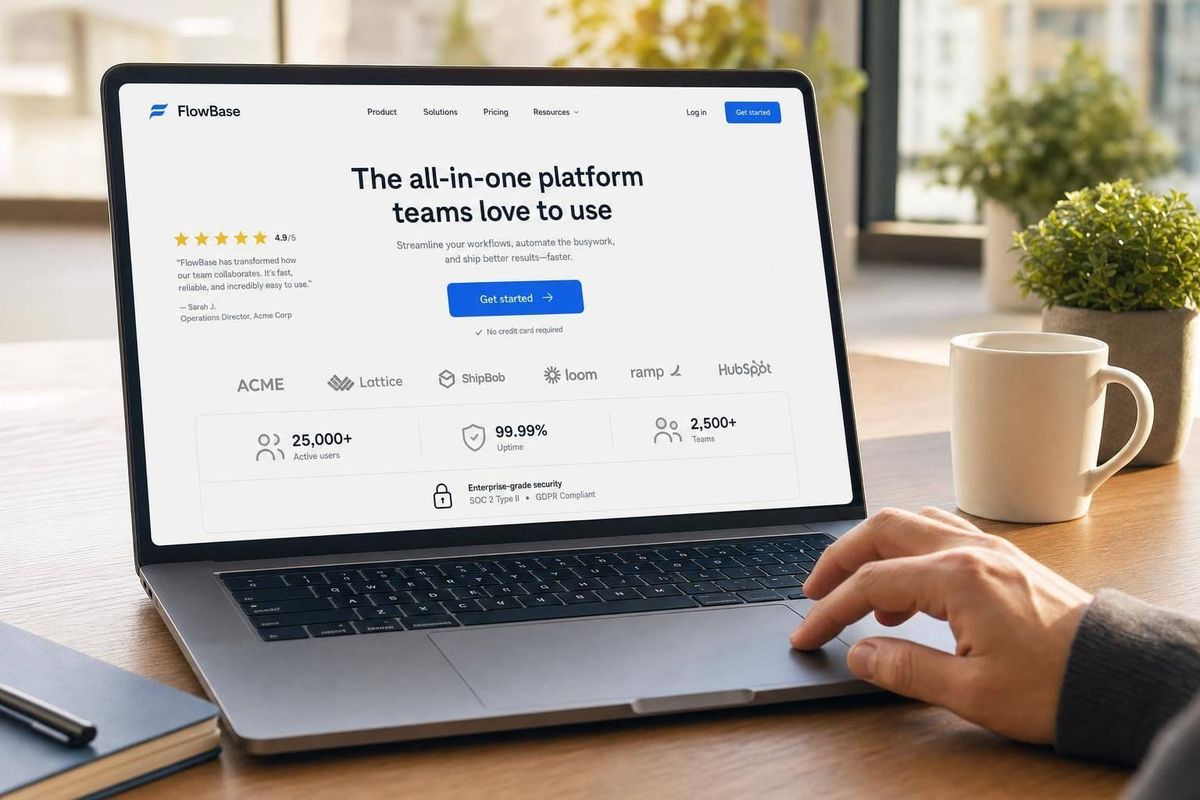
Most SaaS buyers don’t need more claims. They need proof they can check. If I want to build trust fast, I should focus on four things first: reviews, case studies and logos, usage numbers, and security or partner proof.
Here’s the short version:
- Reviews and testimonials help cut buyer doubt, especially on pricing, demo, and feature pages
- Case studies work best when they show a clear problem, setup path, and hard results like lower costs or more leads
- Client logos and usage metrics show that other companies already use the product at scale
- SOC 2, ISO 27001, HIPAA, GDPR, and partner listings help answer security, legal, and stack-fit questions
- Placement matters: trust signals near CTAs can improve conversions more than adding extra copy
- Old proof hurts: stale reviews, expired badges, and outdated numbers can make buyers pause
A few numbers stand out:
- Testimonials with a real person and photo can be 35% more persuasive
- Landing pages with reviews can see up to 34% higher conversion rates
- Case studies with ROI data can drive a 40% conversion lift
- A named-customer logo claim can outperform a plain logo strip by 22% vs. 8%
If I had to sum up the article in one line, it’s this: buyers trust proof that is specific, current, and easy to verify. The rest comes down to choosing the right signal for the right page and keeping it up to date.
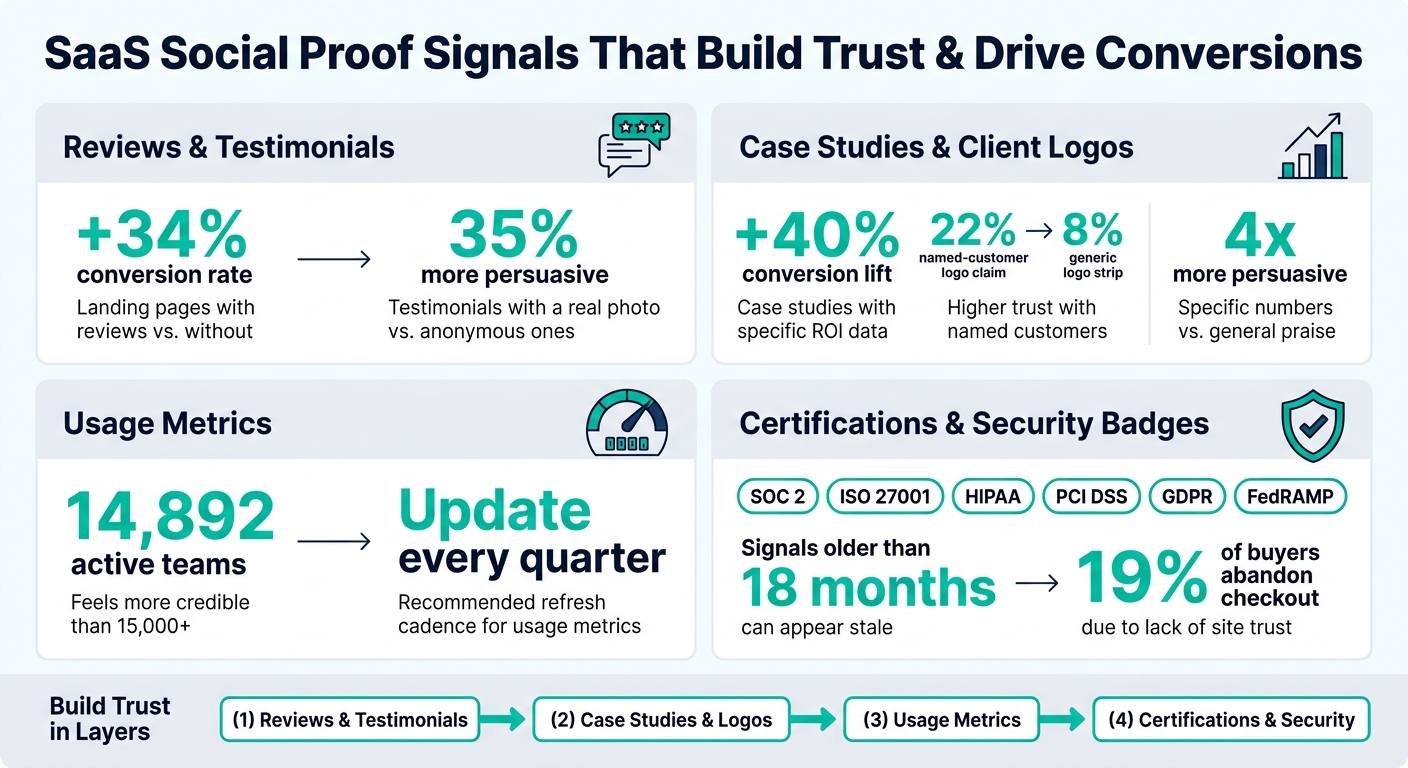
SaaS Social Proof: Key Stats & Trust Signals That Drive Conversions
Casey Hill: We A/B Tested To Find The Social Proof That Actually Drives Conversion
sbb-itb-0a8c96a
Customer Reviews and Testimonials That Reduce Purchase Risk
Reviews and testimonials help buyers check a product before they ever speak with sales. They matter most when they deal with a clear objection.
There’s a simple split here. Testimonials on your site are hand-picked, so you can line them up with certain features, use cases, or doubts. Third-party reviews on sites like G2, Capterra, and TrustRadius play a different role. Because they sit outside your control, procurement teams and enterprise buyers tend to trust them more. On-site testimonials support your pitch. Third-party reviews confirm it. You need both: on-site quotes for relevance, outside reviews for verification.
What Makes a Review or Testimonial Credible on a SaaS Site
Generic praise doesn’t do much. Specific details do.
A strong testimonial includes the customer’s name, role, company, problem, and a measurable result tied to the product. That’s the kind of proof people can actually believe.
Use quotes that spell out:
- who the customer is
- what problem they had
- what changed after using the product
Testimonials tied to a real person with a professional headshot are 35% more persuasive than anonymous ones. Aggregate ratings also need enough volume to feel believable. If you have fewer than 10–20 reviews, people may hesitate. And a perfect score can look a little too polished, which can hurt trust instead of helping it.
Where to Place Reviews and Testimonials for the Most Impact
Put testimonials on pricing, demo, and feature pages. Trust signals should sit next to decision points: beside pricing tiers, above demo request forms, and right after feature descriptions. In plain terms, place proof near the CTA, where it can still calm last-minute doubt.
The table below shows which proof works best in each spot:
| Page Location | Best Proof Type | What It Accomplishes |
|---|---|---|
| Hero section | Single high-authority quote or logo bar | Signals legitimacy immediately |
| Below hero | 2–3 short testimonials addressing top objections | Reduces early friction |
| Feature sections | Feature-specific customer quotes | Validates individual product claims |
| Pre-pricing | ROI-focused or "switcher" testimonials | Frames the price as an investment |
| Near CTA/form | Micro-testimonials and security badges | Removes last-minute hesitation |
Placement matters because proof works best right when someone is deciding. Showing reviews and testimonials on a landing page can increase conversion rates by up to 34%.
How Competitor Analysis Tool Can Reveal Missing Review Proof on Key Pages
A lot of SaaS teams have strong testimonials, but they place them poorly, or they leave them off the pages that matter most.
Competitor Analysis Tool helps teams spot where testimonial proof is missing on pricing, demo, and feature pages. Say a competitor’s pricing page opens with a G2 rating and a switcher testimonial, while yours shows only a feature list. That’s not a small difference. It’s a gap that can affect conversion.
When you can see that gap clearly, you can fix it instead of guessing why visitors aren’t taking the next step.
Once review proof is in place, the next layer is case studies, client logos, and usage metrics.
Case Studies, Client Logos, and Usage Metrics That Show Real Adoption
Reviews show sentiment. Case studies, logos, and usage data show something different: actual adoption. If testimonials tell you who likes a product, these signals show that real companies are using it in day-to-day work.
What to Include in a SaaS Case Study So Buyers Trust the Result
Case studies answer the next thing buyers want to know: does this product work in practice?
A case study builds trust when it reads like a customer story, not a pitch. The strongest version includes the customer’s industry or segment, the role of the person quoted, the exact problem they faced, how setup or migration happened, how long it took, and the measurable outcome.
Specific numbers do more work than long explanations. A before-and-after comparison - like CPA dropping from $45 to $17 or a cost saving of $62,000 per year - hits harder than a vague line about better efficiency. Specificity is 4x more persuasive than general praise.
Migration case studies tend to work especially well because they deal with migration anxiety head-on. They’re strongest when they explain the old tool, why the customer left it, and what the move was like. A clear timeline also cuts down the sense of risk around switching. Case studies with specific ROI numbers can deliver a 40% conversion lift on their own.
How to Use Client Logos Without Making the Page Feel Empty or Inflated
A logo bar is a credibility signal. By itself, it’s not a conversion driver. Put a clean row of 6–12 recognizable logos under the hero section to show legitimacy fast, then add context below so it doesn’t look like decoration. Farther down the page, group logos by industry or use case so prospects can spot companies that look like them.
The big mistake is the logo wall: a long grid of brands with no context. It feels like filler.
A better move is to pair logos with a named-customer claim, such as "Used by 8 of the Fortune 50". That can lift conversion by 22%, compared with 8% for a generic logo strip. One more thing: about 32% of reviewed SaaS logo bars include brands that are not actual paying customers, such as integration partners or press mentions. Audit your bar on a regular basis and remove anything that doesn’t belong.
Which Usage Metrics Build Trust and How Often to Update Them
Usage metrics show scale: active teams, workflows processed, transaction volume, or geographic reach. The main point is precision over rounding. "14,892 active teams" feels measured. "15,000+ teams" feels estimated.
Update usage metrics every quarter and refresh case studies every 12–18 months. If you can’t update something, archive it.
Certifications, Security Badges, and Partnerships That Add External Validation
Customer reviews and case studies show that people like and use your product. But when someone is about to share sensitive data or sign a multi-year contract, they need more than praise. They need proof that your product is safe, compliant, and able to work with the tools they already use.
That’s where certifications, security badges, and partner signals matter most. At that point, the buyer isn’t just asking, “Do customers like it?” They’re asking, “Can we verify this?”
Which Certifications and Security Signals Matter Most on SaaS Websites
For U.S.-based SaaS, the main markers are SOC 2, ISO 27001, HIPAA for healthcare, PCI DSS for payments, GDPR for privacy, and FedRAMP for government contracts. SOC 2, ISO 27001, and a trust center show security maturity to procurement and legal teams.
A badge on its own isn’t much proof. If it doesn’t link anywhere, it can feel like an empty claim. Buyers expect each badge to lead to an official registry, a PDF attestation, or a dedicated /trust or /security page. If they can’t check the claim on their own, trust drops fast.
Each badge should also answer a buyer’s question in plain English. Add one short sentence next to each badge so the point is clear to everyone on the buying committee, not just the CTO. And keep certifications current. Signals older than 18 months can start to look stale.
Once the security box is checked, buyers usually move to the next question: Will this fit our stack?
How Partnerships and Integrations Build Trust Before a Buyer Talks to Sales
Official integration badges and app marketplace listings show that your product can fit into a buyer’s current workflow without a sales call to confirm it. That matters because marketplace listings borrow trust from the platform itself.
Technical and procurement teams want proof of fit early. Integration signals help answer that question and lower rollout risk. But they need to feel real, not decorative. Every integration badge should link to the live marketplace listing or the official partner directory.
It also helps to keep integration signals separate from customer proof. Mixing the two can blur the message.
How Competitor Analysis Tool Can Surface Trust and Security Messaging Gaps
A lot of teams miss gaps in their trust messaging simply because they haven’t mapped what appears on each page. If another company lists a certification like HIPAA and you don’t, a healthcare buyer may cut you from the shortlist before you ever hear from them.
One of the fastest ways to spot those gaps is to compare trust signals page by page. Competitor Analysis Tool helps surface those differences by showing where compliance language, security badges, or partner signals appear on a competitor’s site but are missing from yours. That makes it easier to decide which trust signals to add first.
Buyers trust proof they can verify for themselves.
How to Measure, Improve, and Maintain Social Proof Over Time
Adding trust signals to your site is only half the job. The other half is checking whether they change buyer behavior - and making sure they stay current enough that buyers don't pause and wonder if the proof still holds up.
Which Metrics Show That Social Proof Is Actually Working
Once your proof is live, look at behavior instead of vanity metrics. That means checking whether people reach the parts of the page where your testimonials and case studies appear. Scroll depth can help you see that.
Then compare pricing page bounce rate and trial start rate before and after you add trust signals or move them to a new spot. Small placement changes can have a big effect. If buyers drop off at the payment step, watch abandonment rate next to security badge placement. That matters because 19% of U.S. buyers who abandon the payment step leave because they don't trust the site with their credit card information.
It also helps to watch MQL-to-SQL conversion rate. If your social proof is pulling in better-fit leads, that number should improve over time. And don't rely only on analytics dashboards. Ask new users which proof influenced their decision most.
When to Refresh or Remove Old Trust Signals
Old reviews and stale case-study numbers can hurt trust fast. Trusted SaaS brands tend to keep reviews that are less than 90 days old. So if a case study still shows old metrics, it doesn't calm buyer doubts - it can spark new ones.
A simple cleanup usually goes a long way:
- Remove testimonials from churned customers
- Update usage metrics as your numbers grow
- Replace any certification badge that has expired or is no longer current
Keep proof current, specific, and easy to verify.
Conclusion: Which Trust Signals SaaS Teams Should Prioritize First
A good way to do this is in layers. Start with reviews and testimonials so buyers see a basic level of credibility right away. Then add case studies and client logos to show that companies like them already use your product. After that, add usage metrics to show scale. Finally, use certifications, security messaging, and integration signals to lower risk near the point of decision.
If one type of proof improves the numbers, build that out first. If it doesn't, look at placement before you add more. The harder part is knowing which gaps matter most right now. Competitor Analysis Tool can help by showing where your site is missing trust signals, so your team can focus on the fixes most likely to move buyers forward instead of guessing where to begin.
FAQs
Which trust signal should I add first?
If you don’t have customers yet, start with founder and team authority.
That means showing people there are real experts behind the product. You can do that by sharing sharp insights on LinkedIn or X, publishing technical content, or joining podcasts.
Once you have customers, add a specific testimonial that includes:
- Name
- Photo
- Job title
- Company
For cold traffic, put that social proof above the fold, close to the hero headline or primary call to action.
How many reviews do I need to look credible?
Aim for 10 to 20 reviews to build trust. A perfect 5.0 can look a little too polished. In many cases, a 4.6 to 4.8 rating with more reviews feels more believable.
Most buyers put more faith in a larger pool of reviews than in a spotless score. Why? Because review volume signals real customer feedback and shows that the product has traction.
What makes a trust badge believable?
A trust badge works when people can check it, understand it fast, and see why it matters to them. If a badge is vague or anonymous, it can feel made up. But badges linked to third-party platforms like G2 or Trustpilot carry more weight because they come from an outside source.
Stick with logos people know, not obscure ones. And place each badge where it answers a clear concern. For example, show security badges at checkout, or display compliance badges on B2B pages where buyers are looking for proof.