
10 Common Content Gaps SaaS Websites Overlook
Fix 10 common SaaS website content gaps—decision-stage pages, competitor comparisons, use-case, role & industry pages, onboarding, security.

SaaS websites often lose potential customers by failing to address critical content gaps. These gaps include missing decision-stage resources, competitor comparisons, use-case pages, and role-specific insights. Without this information, buyers struggle to evaluate options, leading to stalled deals and lost revenue.
Key takeaways:
- Decision-stage content like "vs." and "alternatives to" pages can boost conversions by 7.5% or more.
- Role-specific pages address unique concerns for stakeholders like Finance, IT, and Legal.
- Use-case content directly solves buyer problems, driving 3-5x higher conversion rates.
- Onboarding and support content reduces churn by up to 40%.
- Industry-specific pages improve relevance and capture niche search traffic.
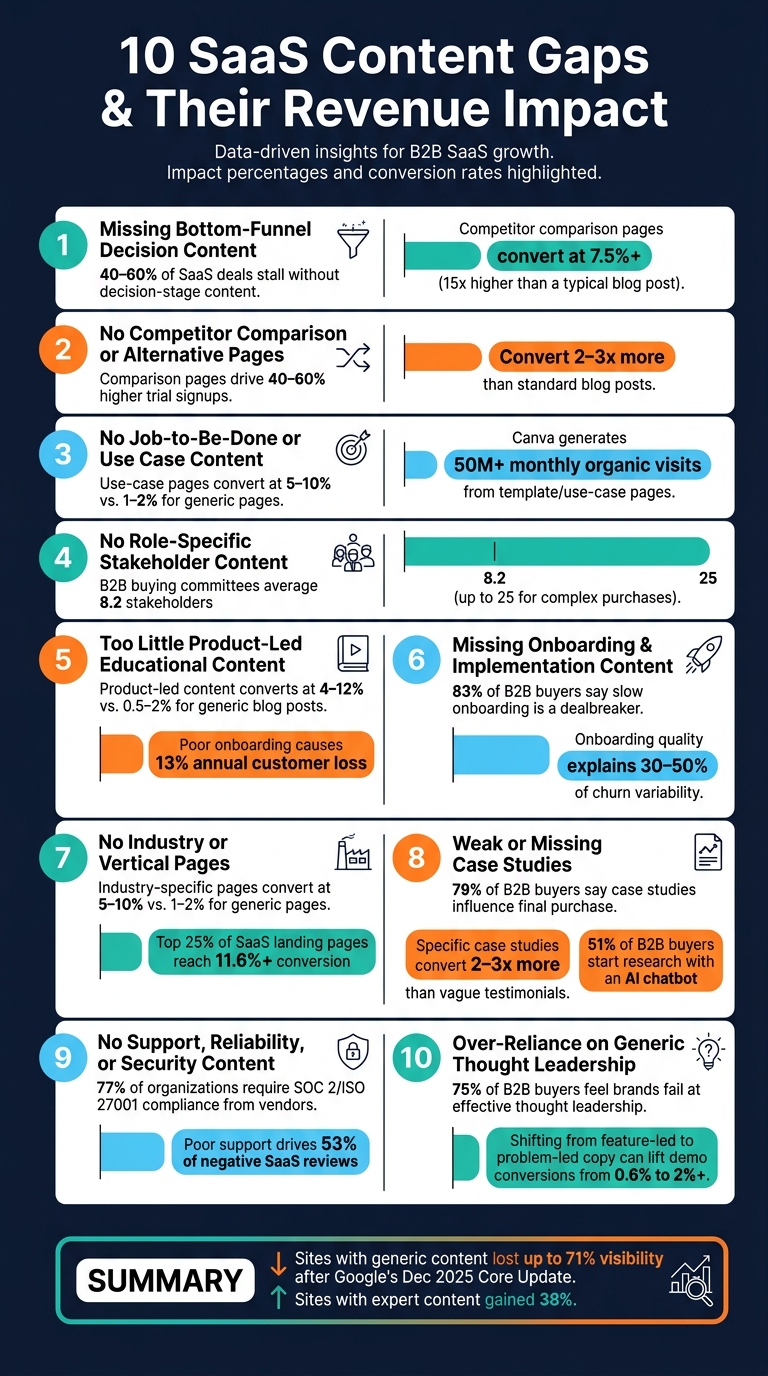
10 SaaS Content Gaps: Key Stats & Conversion Impact
How to Build a Content Strategy for SaaS Companies
sbb-itb-0a8c96a
1. Missing Bottom-Funnel Decision Content
Many SaaS websites excel at publishing educational pieces like guides and how-to articles. But when it comes to decision-stage content - the kind buyers need when they're ready to make a choice - there’s often a glaring gap. When potential customers search for comparisons vs competitors or workflow solutions, they frequently come up empty-handed, forcing them to seek answers elsewhere. This disconnect can derail their journey from evaluation to purchase.
Here’s the impact: 40% to 60% of SaaS deals stall because buyers don’t have the decisive content they need. As Copy.ai aptly put it:
"Content gaps are not just an SEO problem. They are a revenue problem." - Copy.ai
Decision-stage formats like "vs." pages, "alternatives to" pages, and use-case landing pages are game-changers for conversions. For example, competitor comparison pages boast an impressive 7.5%+ conversion rate - about 15 times higher than a typical blog post. Similarly, use-case landing pages can achieve 3 to 5 times higher conversion rates from organic traffic compared to generic feature pages. A real-world example? A B2B SaaS company in the email marketing space created a technical guide for a niche data synchronization issue. While the search volume was low, the content directly led to over $50,000 in new monthly recurring revenue (MRR) from three enterprise deals within just 90 days.
One common oversight is failing to leverage insights from sales calls. In one analysis, 40% of prospects asked about a specific integration during calls, but the company had no content addressing it. Reviewing call transcripts or collaborating with Sales and Customer Success teams can uncover these gaps quickly. You can also analyze competitor websites to see where they are outperforming you in the decision stage. These insights often highlight the exact questions and pain points that decision-stage content should address.
With 61% of B2B buyers preferring a rep-free buying experience, your website’s bottom-funnel content often serves as the sole voice during a buyer’s private evaluation process. If this content is missing, your website simply isn’t part of their decision-making journey.
2. No Competitor Comparison or Alternative Pages
One common oversight in SaaS websites is the lack of competitor-specific content, particularly comparison and alternative pages. While most sites include a blog, features page, and pricing section, they often miss these critical pages - leaving high-intent traffic up for grabs. Buyers searching for direct product comparisons aren’t just browsing; they’re ready to make a decision. In fact, comparison and alternative pages perform exceptionally well, converting 2–3 times more than standard blog posts and driving 40%–60% higher trial signups. Including these pages strengthens your strategy for capturing leads who are ready to commit.
This gap is even more pronounced with the rise of AI-driven search tools. These tools extract structured comparison data - like tables, feature breakdowns, and side-by-side analyses - to respond to queries with terms such as "vs", "alternative", and "best".
"AI systems recognize purchase intent signals through query patterns like 'vs,' 'alternative,' 'comparison,' and 'best' combined with product names." - Ten Speed
If your website doesn’t provide structured data for these types of queries, it risks being invisible to potential buyers at a crucial stage in their decision-making process. To tackle this issue, tools like Competitor Analysis Tool can help. This tool identifies gaps in your site’s content by comparing it to competitors. It highlights visibility and demand gaps, including high-intent keyword clusters your competitors rank for but you don’t. Instead of guessing which comparison pages to prioritize, you’ll know exactly where to focus - no advanced SEO skills needed.
3. No Job-to-Be-Done or Use Case Content
SaaS websites often fall into the trap of focusing solely on product features, ignoring the actual problems their buyers are trying to solve. But here’s the thing: buyers aren’t searching for features - they’re searching for solutions. They want to know how to reduce churn, automate expense approvals, or stop emails from landing in spam folders. If your content doesn’t speak their language, you’re missing out on the moments that matter most. That’s where job-to-be-done (JTBD) and use-case content come into play. These pages are designed to directly address buyer intent, just like bottom-funnel content. For SaaS founders, mastering this alignment is the key to sustainable growth.
When you skip JTBD or use-case content, you’re leaving your audience’s challenges unresolved. Unlike static feature pages, use-case pages can branch out into multiple targeted pages, helping you capture long-tail keywords. This not only boosts your SEO but also drives better conversion rates. In fact, research shows that use-case pages convert at rates between 5% and 10%, compared to the 1% to 2% seen on general organic landing pages. Companies like Ramp, Shopify, and Canva are proof of this strategy’s success. Canva, for example, generates over 50 million monthly organic visits from its template pages alone, while use-case pages for these companies achieve conversion rates 3 to 5 times higher than their generic counterparts.
"Feature pages describe your product. Use-case pages solve your buyer's problem. In B2B SaaS, the second approach converts more pipeline." - Jakub Startek, CEO & Growth Advisor, Grafit Agency
To create effective use-case content, start by mining your internal data. Listen to sales calls, dig into support tickets, and conduct interviews to uncover the language your buyers use. Then, structure your pages around a clear "Buyer, Problem, Outcome, Proof" framework. And don’t settle for generic calls-to-action like “Book a Demo.” Instead, use specific, action-oriented prompts such as "See how this workflow fits your team." These small changes can make a big difference in connecting with your audience and driving results.
4. No Role-Specific or Stakeholder Content
When SaaS websites cater only to a single audience - often the product champion - they miss the mark for the broader buying committee. The champion, typically a team member who discovers and advocates for the product, rarely makes purchasing decisions in isolation. In fact, B2B SaaS buying committees average 8.2 stakeholders, and for more complex purchases, that number can exceed 25 people. If your website speaks only to the champion, other critical stakeholders - like Finance, IT, Security, and Legal - are left to figure out the product’s value on their own.
This puts an unfair burden on the champion, who must translate your product’s benefits to colleagues with very different priorities. For instance, a CFO might focus on ROI and cost predictability, while an IT director evaluates integration and support needs. Meanwhile, a security lead will prioritize compliance documentation and data handling practices. Vague messaging like "Built for modern teams" simply doesn’t address these distinct concerns.
"If the website only arms the champion and ignores everyone else, the deal becomes dependent on that person translating your value internally. That is slow and unreliable." - Raze Growth
The fix? Create role-specific content paths. Imagine your website as a shared entry point with clearly defined paths for each stakeholder. The homepage sets the stage, but dedicated pages - like /security, /roi, and /it-teams - address specific needs in detail. This way, stakeholders can quickly find the information that matters most to them, without needing to schedule a demo just to confirm compliance or technical fit.
A great starting point is to analyze your last 20 meaningful sales objections and categorize them by role. This will highlight which stakeholder concerns your site currently overlooks. Then, develop tailored resources: an ROI calculator for Finance, a technical architecture overview for IT, or a compliance checklist for Legal. These tools not only inform stakeholders but also empower your champion with the materials they need to drive decisions faster.
| Stakeholder | Primary Concern | Effective Content |
|---|---|---|
| Champion / End-User | Ease of use, daily efficiency | Product walkthroughs, use-case pages, how-to guides |
| CFO / Finance | ROI, budget risk, payback period | ROI calculators, TCO breakdowns, cost-comparison sheets |
| CTO / IT | Security, integrations, scalability | SOC 2 reports, API docs, architecture notes |
| Procurement / Legal | Contract risk, compliance, vendor stability | SLA overviews, compliance checklists, vendor risk profiles |
This approach not only reduces friction in the buying process but ensures every stakeholder feels informed and confident in their decision. Plus, it strengthens your champion’s ability to advocate effectively within their organization.
5. Too Little Product-Led Educational Content
Many SaaS websites fall into the trap of publishing blog posts that explain general concepts but fail to show practical, product-based solutions. Product-led educational content takes a different approach - it teaches skills or workflows while seamlessly integrating your product as the tool to accomplish the task. This type of content doesn’t just inform; it drives conversions. In fact, it outperforms generic informational posts, with conversion rates ranging from 4% to 12%, compared to just 0.5% to 2% for traditional blog posts.
A standout example is Ahrefs’ "How to Do Keyword Research" guide. By walking readers through their Keyword Explorer tool, the guide achieves a conversion rate of about 6% while contributing to over 700,000 monthly organic visits.
"The goal is not a product demo disguised as a blog post. It is a genuinely useful walkthrough where your product happens to be the best instrument for the job." - Monolit
This lack of product-led content impacts both customer acquisition and retention. When users struggle to see immediate value from a product, they often leave. Poor onboarding experiences alone lead SaaS companies to lose 13% of their customers annually. However, a strong educational content strategy can reduce early churn by 20% to 40%. For instance, Practice Better, a health-tech SaaS, introduced advanced use-case guides for practitioners and saw a 193% increase in click growth and a 322% increase in impression growth.
"The SaaS company that treats post-conversion content as a support function rather than a commercial one is leaving customer retention on the table." - Graeme Whiles, SEO Consultant
So, where do you start? A simple first step is to review your support inbox. Identify the top 10 most frequently asked questions - each one represents a content gap. Turn these into detailed how-to guides that solve problems using your product. Here’s how different content types align with the customer journey:
| Content Type | Target Stage | Primary Goal |
|---|---|---|
| "What Is" Guides | Awareness | Introduce core concepts before signup |
| "How-to" Tutorials | Consideration/Retention | Help users complete tasks with your product |
| Use Case Pages | Consideration | Highlight value for specific roles or industries |
| Advanced Guides | Retention | Turn users into experts and reduce churn |
Ultimately, users don’t care about features like "advanced filtering" - they care about solving problems, like finding a specific customer segment in under 30 seconds. Craft content that focuses on outcomes, making your product the obvious choice. Addressing this gap not only aligns your content with buyer intent but also drives meaningful, actionable results.
6. Missing Onboarding, Implementation, and Change Management Content
Many SaaS websites put all their energy into driving sign-ups but fail to address what happens after. B2B buyers often hesitate without clear answers to key questions: How hard is it to set up? What happens during the first 30 days? Who manages the transition? When this type of content is absent, uncertainty creeps in, making it harder to close deals and retain customers in the long run.
Here’s a telling statistic: 83% of B2B buyers consider slow onboarding a dealbreaker. Onboarding quality alone can explain 30% to 50% of churn variability. These numbers make one thing clear - effective onboarding isn’t just a nice-to-have; it’s a major factor in keeping customers around.
"Onboarding equips new users with the necessary steps to succeed." - Beena
But onboarding doesn’t stop with the first user. There’s also the challenge of the "second user" - a new team member who joins after the initial sale. Without tailored onboarding resources, they may struggle to figure things out on their own or overburden support teams. Creating role-specific guides for admins, end users, and executives can prevent these issues, ensuring long-term account health.
To round out the customer journey, detailed onboarding content is just as important as decision-stage materials and role-specific pages. Start small: publish a concise "Getting Started" page (no more than 500 words) that guides a new user from account creation to their first success. Add an implementation timeline that outlines required internal resources, giving procurement teams, IT staff, and finance departments a clear picture of what to expect. This level of transparency reassures stakeholders who are silently wondering, "How disruptive will this be?"
7. No Industry, Segment, or Vertical Pages
When SaaS websites fail to address industry-specific needs, they miss the chance to connect with qualified buyers. Often, these sites focus on explaining what their product does but overlook who they’re speaking to. This oversight can cost them valuable leads. Think about it: a healthcare administrator searching for "HIPAA-compliant project management software" has very different needs than a marketing agency leader looking for client reporting tools for agencies. Without dedicated pages tailored to these contexts, your site might not rank for the specific queries that matter most. Just like the gaps in decision-stage and role-specific content, ignoring industry-specific needs leaves critical buyer questions unanswered.
The numbers back this up. Targeted industry pages consistently outperform generic ones in conversion rates. While generic organic pages convert at just 1–2%, industry-specific pages can hit conversion rates of 5–10% - that’s three to five times higher. For perspective, the median SaaS landing page converts at around 3.8%, but the top 25% - those often leveraging niche targeting - reach 11.6% or more.
"A vague page excludes more qualified buyers than a specific page ever will." - Raze Growth
But this isn’t just about showing up in search results. Today’s B2B buying decisions involve an average of 8.2 stakeholders. Each person on the committee has unique concerns - a CFO wants to see a strong financial case, while the IT lead needs assurance the tool integrates seamlessly with existing systems. Without industry-specific pages, stakeholders are left to piece together how the product fits their needs, which can slow down or derail the decision-making process.
And no, simply duplicating your homepage won’t cut it. To create effective vertical pages, you need to dig into your buyer’s specific context. Highlight their challenges, outline the outcomes they’re aiming for, and provide tailored proof points that address their concerns. The goal is to make the content resonate immediately. As Mërgim Fera and Lav Abazi, co-founders of Raze Growth, aptly say:
"High-converting SaaS use case pages sell the solved problem, not the software category."
8. Weak or Missing Case Studies and Social Proof
After crafting targeted content for different decision stages, it's crucial to back it up with strong case studies and social proof. Even the best SaaS products can't sell themselves without evidence to support their claims. Consider this: 79% of B2B buyers say vendor-produced case studies influence their final purchase decision. Yet, many SaaS websites either hide their success stories in obscure sections or skip them altogether. When potential buyers can't find clear examples of how your product has worked for others, they start to doubt - and doubt can kill a deal. To win over enterprise buyers, your proof needs to be detailed and directly address their concerns.
The level of detail in your proof matters just as much as having it. A generic testimonial like "great tool, highly recommend" won’t cut it for an enterprise buyer who’s naturally skeptical. As Rob Palmer, an experienced direct-response copywriter, explains:
"Enterprise buyers are professional skeptics. They have been burned by software vendors who over-promised and under-delivered... their reputation is on the line if the purchase fails."
Case studies with specific, measurable results - real numbers, timeframes, and company names - are far more effective. These kinds of case studies convert at 2 to 3 times the rate of vague testimonials. A headline like "How Acme Corp Reduced Support Costs by $127,000 in 12 Months" gives buyers something concrete to share with their CFO. On the other hand, a vague claim leaves them empty-handed.
Placement is just as important as content. Many SaaS companies make the mistake of relegating social proof to the bottom of their website, often as a cluster of logos. But research shows that including ROI-focused testimonials above pricing can boost conversions by up to 34%. In fact, 96% of the fastest-growing SaaS companies place customer logos prominently in their hero section. The key is to display the right proof at the right moment, giving buyers the reassurance they need when they need it most.
There's also a new twist that many SaaS marketers are overlooking. 51% of B2B software buyers now begin their research with an AI chatbot rather than a traditional search engine. These AI systems rely on publicly available case studies to provide answers. If your proof is hidden in a PDF or filled with vague, flowery language, it won’t get picked up. To stay relevant, your case studies need to be structured, specific, and HTML-based - designed to serve both human readers and AI-driven queries.
"The buyer is no longer skimming your case study at the start of the journey. They're asking an AI a question, and the AI is deciding whether you're the answer." - Andy Stauffer, Founder & CEO, Proofmap
9. No Content on Support, Reliability, or Security
Case studies can make a strong argument for your product's effectiveness, but they’re only part of the story. Buyers also need to know what happens after they commit. What if something breaks? Who can they contact? Is their data protected? If your website doesn’t address these questions upfront, it creates a trust gap that’s tough to bridge.
Here’s the reality: 77% of organizations require compliance with standards like SOC 2, ISO 27001, or NIST from third-party vendors. Yet, many SaaS websites either bury this information or leave it out entirely. And with 61% of B2B buyers preferring a rep-free buying experience, they want these details readily available without having to speak to a sales rep. If they can’t find them? They’ll likely move on to a competitor.
Customer support content faces a similar problem. Poor customer support is the top driver behind 53% of all negative SaaS reviews. The issue often starts before a customer even signs up - when websites hide support details behind a "contact us" button or rely on vague promises like "we're here to help." Buyers are left skeptical. Instead, clearly outlining response times, communication options, and escalation paths can ease concerns. And then there’s documentation: 38% of B2B SaaS help center articles contain inaccuracies. Encountering outdated or incorrect documentation during the evaluation process doesn’t just frustrate buyers - it shakes their confidence in the product itself.
"The hidden cost of documentation decay is not just the support tickets that wrong articles generate. It is the cumulative trust damage: every time a user follows documentation to a dead end, they lose confidence in the product." - Henrik Roth, Co-Founder & CMO, HappySupport
Thankfully, closing this trust gap doesn’t require a massive overhaul. Start by making key trust signals easy to find. Publish uptime data, list compliance certifications, and be transparent about support response times. Replace vague security claims like "enterprise-grade security" with concrete details, such as "Data is encrypted at rest using AES-256". These specifics don’t just reassure buyers - they also help AI search tools confidently recommend your product.
10. Over-Reliance on Generic Thought Leadership
SaaS blogs often churn out content that sounds polished but falls short of offering actionable insights. Phrases like "The future of work is hybrid" or "AI is transforming every industry" might grab attention, but they don’t help potential buyers figure out if your product is the right solution for them. In fact, 75% of B2B buyers feel the brands they follow fail at delivering effective thought leadership. Yet, many SaaS companies stick to producing this kind of vague, generic content.
The main issue lies in what some experts describe as "feature-led positioning" - content that sparks curiosity but doesn’t inspire urgency.
"Feature-led positioning attracts curiosity, not urgency." - Anwesha Roy, Product Marketing Partner, Groie
This approach stands in stark contrast to messaging that creates a sense of urgency and drives conversions, as highlighted in earlier discussions. Generic content tries to speak to everyone but ends up answering no one’s specific questions. Buyers are left wondering, "Does this product solve my problem?" If your messaging is broad enough to apply to any company in your category, it essentially applies to none.
Here’s a telling example: a Series A SaaS company discovered that 70% of its homepage copy was feature-led, which contributed to a dismal conversion rate of under 0.6%. By shifting to messaging that focused on specific business challenges and operational risks, their demo conversion rate jumped to over 2% - without adding any new pages.
The tendency to rely on broad messaging is especially common among large SaaS companies, whose business models often require catering to a wide audience, making it harder to conduct a competitive analysis and find a unique angle. However, smaller SaaS companies have an opportunity to stand out by addressing specific pain points and taking a clear, bold stance.
The solution isn’t about producing more content - it’s about creating sharper, more focused content. Publish proprietary data. Share a contrarian viewpoint. Tackle the exact workflow challenges your buyers are facing right now. Buyers can tell when a company doesn’t fully believe in its own story, and generic thought leadership only amplifies that disconnect.
Conclusion
These ten gaps leave buyers stuck without the answers they need to move forward. This hesitation slows down sales pipelines, increases customer churn, and gives competitors the upper hand.
After Google's December 2025 Core Update, sites relying on mass-produced, generic content saw visibility drop by as much as 71% in product review segments. In contrast, content showcasing real expertise and first-hand experience experienced a 38% visibility boost during the same time. The takeaway? Quality and relevance are what drive results.
"Rankings are not only traffic. They're trust. If a reader sees the same competitor showing up for every question in your niche, that competitor starts to feel like 'the safe choice.'" - CurratedBrief
This insight highlights the urgency of addressing these gaps. The first step is understanding where your competitors are excelling. Tools like Competitor Analysis Tool make it easy to pinpoint demand, messaging, and visibility gaps - no SEO background needed - so you can take action where it matters most.
Gap analysis isn’t a one-and-done task. Competitors adapt, buyer needs shift, and AI continues to reshape how visibility works. SaaS companies that consistently grow are the ones asking themselves: "What questions are our buyers asking that we’re not answering?" That’s where the journey begins.
FAQs
Which content gaps should I fix first for faster pipeline impact?
When it comes to filling content gaps, your first priority should be problem-stage and use-case material. Why? Because this type of content speaks directly to high-intent visitors who are already aware of their challenges and are actively searching for solutions.
By focusing on these areas, you can address the specific workflows and pain points your audience is dealing with. This approach not only helps you connect with users when they’re making critical decisions but also drives quicker results for your pipeline. It’s all about capturing demand at the right moment and turning it into meaningful engagement.
How do I find buyer questions to turn into bottom-funnel pages?
Before potential customers even find your product, they’re likely searching for solutions to specific problems or exploring use-case scenarios. Think of queries like: “Why is my churn increasing?” or “How to track feature adoption?” These types of searches reveal both pain points and goals, offering a window into what your audience needs most.
To stay ahead, compare your content with competitors. Are they addressing questions you’ve overlooked? Use this analysis to pinpoint gaps in your coverage. Dive deeper by examining customer conversations, browsing forums, and analyzing search data to uncover the exact terms and phrases your audience uses.
Once you’ve identified high-demand, relevant questions, focus on creating pages that directly address these needs. Make sure each page aligns with the intent behind the search and is designed to drive conversions.
What should be on role- and industry-specific pages to convert?
To truly connect with your audience and drive conversions, your pages need to speak directly to the unique challenges and goals of each role or industry you're targeting. Instead of listing features, focus on how your product solves specific problems and delivers clear, measurable outcomes.
Here’s how to make your pages work harder:
- Address unique workflows and pain points: Show that you understand the daily struggles of your audience. For example, highlight how your solution simplifies repetitive tasks or improves efficiency.
- Use tailored CTAs: Craft calls-to-action that feel personal and relevant. Instead of generic phrases like "Learn More", try something like "See How [Your Product] Saves Time for Marketing Teams."
- Incorporate social proof and case studies: Trust is everything. Share testimonials, success stories, or stats that demonstrate how others in similar roles or industries have benefited.
- Highlight targeted benefits: Speak their language. For technical users, emphasize integrations and compatibility. For finance teams, focus on ROI and cost savings.
By zeroing in on what matters most to your audience, you can create pages that not only grab attention but also build trust and inspire action.