
SaaS Competitor Traffic Sources: Gap Analysis
Match tools to gap types to find channel, audience, and keyword traffic gaps fast and prioritize fixes.
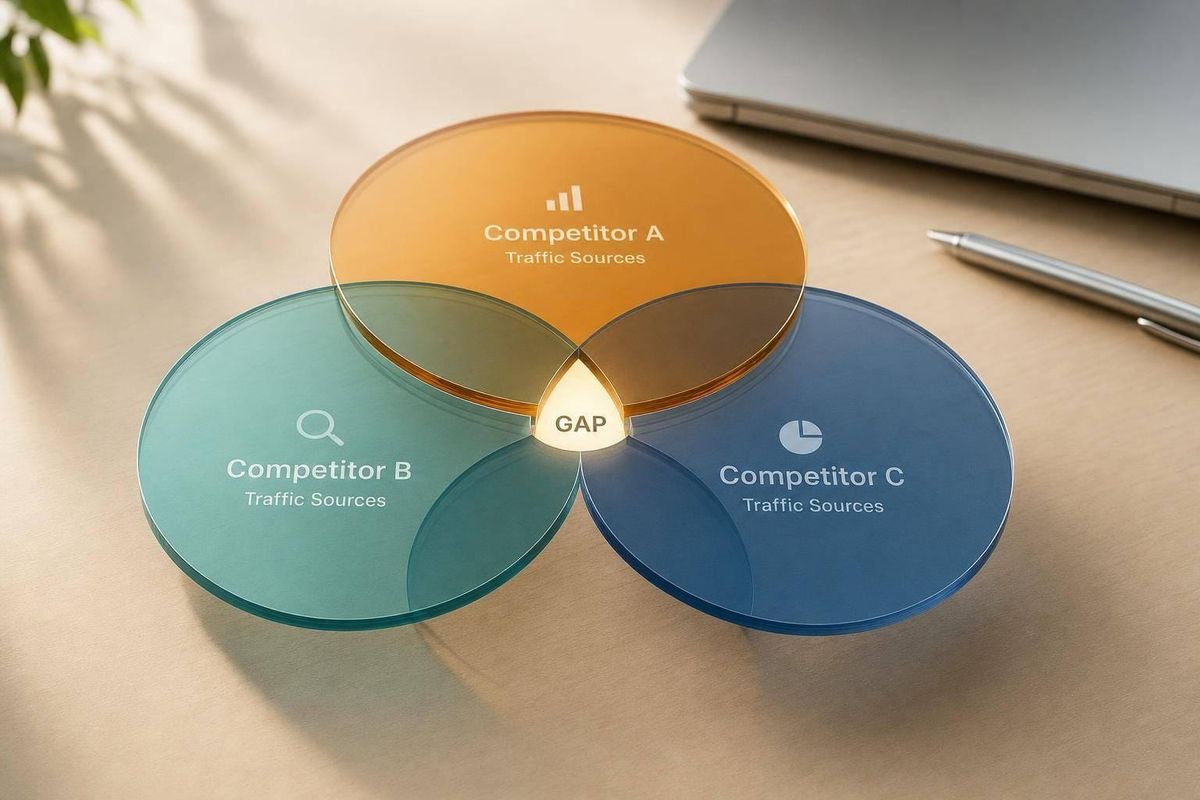
If you want to find traffic gaps fast, start by matching the tool to the type of gap. In this review, I’d use Similarweb for channel-share checks, Semrush for channel paths and audience overlap, Ahrefs for search gaps, SE Ranking for simple cross-channel checks, and Competitor Analysis Tool when I want one view of demand, messaging, and visibility.
Here’s the short version:
- Competitor Analysis Tool: best for a fast read on why a gap exists
- Similarweb: best for channel mix and traffic-share percentages
- Semrush Traffic & Market Toolkit: best for audience overlap, engagement, and post-visit paths
- Ahrefs Site Explorer: best for organic search, paid search, and keyword gaps
- SE Ranking Competitive Research: best for simple source-share and geo/device checks
What matters most is not raw traffic estimates. It’s the share by channel, the market or device split, and whether the gap points to demand, messaging, or visibility. For example, if a rival gets 60% of visits from organic search and you get only 8% from social, that usually points to a source-mix problem you need to explain, not just a reporting quirk.
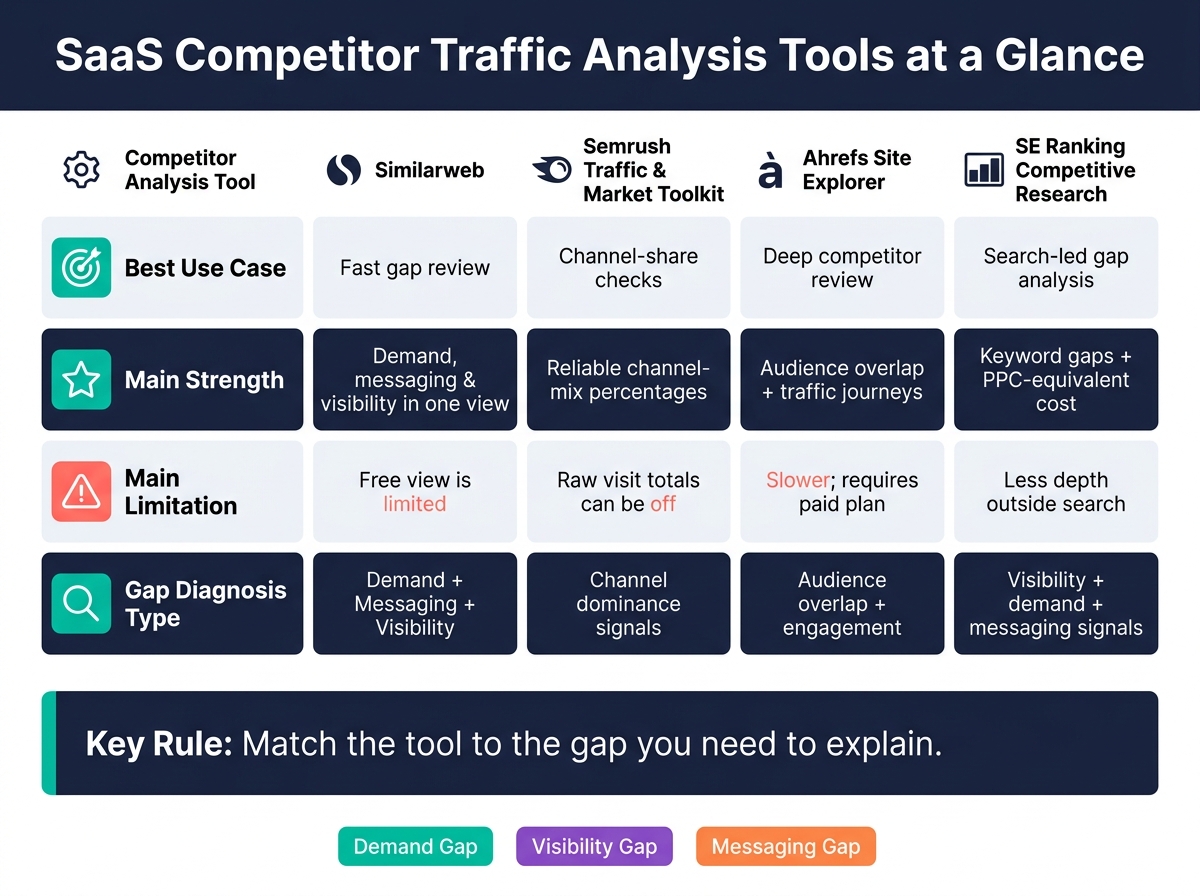
SaaS Competitor Traffic Analysis Tools: Side-by-Side Comparison
Semrush Traffic Analytics Tutorial: How to See Where Your Competitors Get Their Traffic
sbb-itb-0a8c96a
Quick Comparison
| Tool | Best Use | Main Strength | Main Limitation |
|---|---|---|---|
| Competitor Analysis Tool | Fast gap review | Shows demand, messaging, and visibility in one place | Free view is limited |
| Similarweb | Channel-share checks | Good percentage split across traffic sources | Raw visit totals can be off |
| Semrush Traffic & Market Toolkit | Deep competitor review | Audience overlap, top pages, and traffic journey | Takes more time and needs a paid plan |
| Ahrefs Site Explorer | Search-led gap analysis | Keyword gaps, top pages, and traffic cost estimates | Less depth outside search |
| SE Ranking Competitive Research | Basic cross-channel review | Easy source-share, country, and device views | Lighter non-search detail |
If I were doing this for a U.S. SaaS company on Aug. 26, 2026, I’d compare competitors by country, device, and channel percentages first, then use keyword and referral data to see what to fix first.
1. Competitor Analysis Tool
This tool turns traffic-source gaps into signals about demand, messaging, and visibility. Competitor Analysis Tool shows where competitors win channel share and explains why those gaps exist. It’s built for SaaS teams that want clear answers without needing deep SEO know-how.
Channel-Share Depth
The tool breaks down traffic acquisition across organic search, paid search, direct, social, referral, and display. It also maps the Traffic Journey so you can see where traffic starts and where it leaves.
That exit data matters. It helps you spot referral gaps and partner sites you may be missing. For example, if a competitor keeps sending visitors to review platforms like G2 or Capterra, that’s a visibility gap you should pay attention to.
Gap Diagnosis
The tool labels each gap type in plain English. If a competitor gets a large share of traffic from organic search, they’ve likely built a strong content edge. That points to a demand gap, and those usually take time to close.
If paid search makes up a big slice of their traffic, that often means they’ve found keywords that convert well. That’s more of a visibility gap, and it may be worth testing. The tool also shows audience overlap. Low overlap means they’re reaching people you aren’t, which points to a demand gap in audience segments your messaging hasn’t spoken to yet.
Actionability
The point isn’t just the chart. The point is knowing what to fix first.
Sorting competitor keywords by traffic share percentage helps you spot priority keywords tied to demand gaps. The Traffic Journey chart shows the exit sites with the heaviest post-visit traffic, which can point to messaging and visibility openings for sponsored content or display campaigns. Traffic by country and region can also show where your channel mix is thin, giving you a clearer view of geographic markets worth testing.
2. Similarweb
If you want a quick snapshot of a competitor’s traffic mix, Similarweb is a good place to start. It shows where traffic is coming from across seven channels: direct, organic search, paid search, social, referral, email, and display.
That kind of split helps you spot patterns fast. Maybe a competitor gets a big chunk of traffic from organic search. Maybe they lean hard on paid search. Either way, you get a clearer sense of how they’re pulling people in.
Channel-Share Depth
Similarweb also goes deeper into social traffic by platform, showing which networks, like LinkedIn or Reddit, are driving visits. On the referral side, the referring domains view shows the exact sites sending traffic to a competitor.
That’s useful for one simple reason: it helps you find what you’re missing. If a competitor is getting referral traffic from sites you’ve never partnered with, that’s a clear lead worth checking. And if one channel looks overloaded while another barely shows up, you can spot that imbalance fast.
Gap Diagnosis
For benchmarking, use traffic shares instead of raw visit estimates. Raw visit counts are best treated as directional. Channel-share ratios are the better comparison point.
Here’s the basic read:
- A high organic share often points to strong content performance
- A large paid-search share can point to efficient keyword capture
Benchmarking Scope
Similarweb also lets you segment data by country and device. Those filters help you see whether a traffic gap is tied to a channel or whether the issue sits in a given market, on mobile vs. desktop, or in engagement patterns.
Use country, device, and engagement metrics to test what’s behind the gap: weak demand capture or weak messaging.
3. Semrush Traffic & Market Toolkit
Semrush goes past a basic traffic-channel view. It adds audience overlap and post-visit paths, which makes side-by-side comparisons across competitors much easier. The Traffic & Market Toolkit is built for teams that want to see not just where traffic comes from, but also who that traffic is and where people go next.
Channel-Share Depth
The toolkit breaks traffic into major channels and adds Traffic Journey. This feature maps referral paths into and out of a competitor’s site. That matters because exit-path data can expose visibility gaps in referral and partner channels that might otherwise slip by.
Gap Diagnosis
Audience Overlap shows whether you’re fighting for the same visitors or missing separate audience segments. Low overlap usually points to audience gaps tied to demand. High overlap, on the other hand, points to direct competition for the same users and weaker differentiation.
Engagement metrics add one more lens here. Measures like pages per visit and average visit duration can show whether a competitor’s messaging or site structure is doing a better job of holding attention.
Actionability
Once the channel gaps are clear, Top Pages helps show which URLs and content formats pull in the most traffic. That gives you a clearer view of content-led demand gaps worth closing.
Traffic Journey can also point to partnership and paid media targets. Post-visit paths show which third-party sites get the most traffic after someone visits a competitor, which can highlight openings for sponsored content or display placements.
4. Ahrefs Site Explorer
Where Semrush leans into audience overlap and post-visit paths, Ahrefs goes deep on search visibility and keyword gaps. It’s strongest when you’re trying to figure out a search-led gap. You can see organic and paid traffic, estimated monthly visits, traffic potential, and PPC-equivalent traffic cost. For SaaS teams, that helps answer a practical question: how much of a competitor’s lead comes from search, and what would it cost to buy that same attention through paid media?
Channel-Share Depth
Ahrefs is strongest for search-led gaps, showing organic and paid traffic, estimated monthly visits, traffic potential, and PPC-equivalent traffic cost. In plain terms, it helps you see whether a rival is winning because they rank well, spend hard on paid search, or both. That matters when search is doing most of the heavy lifting.
Gap Diagnosis
Ahrefs is strongest at keyword-level diagnosis. Content Gap separates visibility gaps from demand gaps: high-volume terms you miss signal visibility; low-volume clusters signal weak demand. If search accounts for most of a competitor’s traffic mix, keyword gaps often explain most of the market-share gap.
Top Pages shows which topics and formats drive competitor traffic. That gives you a clearer read on what’s pulling people in, whether that’s comparison pages, templates, landing pages, or blog content.
Actionability
Once you spot the missing clusters, map them to intent and content type. Don’t chase random high-volume terms one by one. A better move is to map the competitor’s strongest clusters and look for entry points you can actually win using a competitive analysis framework.
| Metric | What It Diagnoses |
|---|---|
| Top Keywords | Specific terms where competitors outrank you |
| Traffic Potential | Total available audience for a keyword cluster |
| Top Pages | Content formats and topics that resonate |
| PPC-equivalent traffic cost | PPC-equivalent value of organic traffic |
| Geo Distribution | Countries where search visibility is growing faster |
5. SE Ranking Competitive Research
Where Ahrefs stays focused on search, SE Ranking gives you a broader view of how different channels shape share. That makes it handy for fast source-share checks, especially when you want to see which channels are driving a competitor’s growth.
Channel-Share Depth
Use the channel split to spot overweighted sources and thin channels fast. It shows where a competitor’s growth is concentrated. From there, you can dig into the reason for the gap: is it visibility, demand, or messaging?
Gap Diagnosis
SE Ranking flags each gap type with a different signal:
- Visibility: keyword rankings and SERP-feature capture show where a competitor holds search positions that you don’t.
- Demand: country-level traffic shows which markets are pulling more share than expected.
- Messaging: top-performing pages show which content formats connect with the audience.
Read bounce rate and traffic shifts in context. A jump or drop doesn’t tell the whole story on its own. Intent mismatch, weak CTAs, algorithm updates, and product launches can all explain the change.
Once the source gap is clear, you can use that view to decide where to shift effort.
Actionability
The main action SE Ranking supports is channel prioritization. When you can see which channels a competitor leans on and which ones they ignore, it becomes much easier to choose where to put time and budget. Use device and geography filters to pinpoint where the channel gap is actually coming from.
How the Tools Compare on Key Gap Criteria
After looking at each tool on its own, it helps to line them up side by side. That makes it much easier to see where each one pulls ahead.
The biggest swing is channel-share depth. Similarweb gives you a broad read on channel ratios. Semrush goes deeper with landing-page, subdomain, and subfolder views. Competitor Analysis Tool keeps the focus tighter and compares the gap itself.
Gap diagnosis is where the differences stand out most. Similarweb reads strategy through channel mix. Semrush uses Audience Overlap and engagement signals to help separate demand gaps from messaging gaps. Competitor Analysis Tool calls out demand, messaging, and visibility gaps directly.
Here’s the side-by-side view of how each tool stacks up for traffic source gap analysis:
| Tool | Channel-Share Depth | Gap Diagnosis | Benchmarking Scope | Actionability |
|---|---|---|---|---|
| Competitor Analysis Tool | Demand, messaging, and visibility gaps in one view | Built for quick three-way diagnosis | Side-by-side domain comparison | Fast analysis and prioritized recommendations |
| Similarweb | Seven standard channels with reliable ratios | Infers strategy from channel dominance signals | High-level percentage comparisons between domains | Good for directional strategy shifts |
| Semrush Traffic & Market Toolkit | Deep breakout across subdomains, subfolders, and top pages | Audience Overlap and Traffic Journey reveal untapped segments and next steps | Side-by-side comparison of up to 5 domains with engagement metrics | Granular next steps: keywords, SERP features, and Traffic Journey opportunities |
| Ahrefs Site Explorer | Organic and paid traffic with keyword-level detail | Content Gap separates visibility gaps from demand gaps | Traffic potential and PPC-equivalent cost across domains | Keyword cluster mapping and top-page analysis |
| SE Ranking Competitive Research | Channel split with growth concentration view | Flags visibility, demand, and messaging gaps by signal type | Device and geography filters for targeted comparison | Channel prioritization based on competitor source mix |
For U.S. comparisons, put more weight on country filters and traffic-map detail than on raw volume estimates alone.
This matrix is handy when you need to pick the right tool for broad benchmarking, search-led diagnosis, or fast gap triage. The next section gets into the practical pros and cons of each option.
Pros and Cons
Each tool does one job better than the others. Some are better for channel mix. Some are better for search visibility. Others help you spot audience overlap. The quick read below helps you match the tool to the gap you need to diagnose.
Competitor Analysis Tool pulls demand, messaging, and visibility gaps into one view. That makes it a strong starting point when you want a fast read without digging through a bunch of reports. The catch is simple: the free analysis only gives basic insights.
Similarweb is great for quick channel-mix checks. If you want to see where traffic is likely coming from, it gets you there fast. Just be careful with absolute traffic numbers, since those estimates can be off. In practice, percentages tend to be more useful than raw totals.
Semrush gives the deepest cross-channel view of the group. It can show audience overlap and traffic journeys, which is helpful when you want a broader picture beyond search alone. The tradeoff is that it takes more time to use, and you’ll need a paid plan.
Ahrefs is strongest when the job is keyword-level search gap analysis. It’s especially useful for finding missed terms and content opportunities. Where it falls short is non-search visibility, including channels like email, direct, and referral.
SE Ranking covers organic search along with broader competitive research across channels. It gives you a wider look than a pure SEO tool, but like Ahrefs, it still offers less visibility into non-search channels.
The table below strips each tool down to its main upside and main downside.
| Tool | Pros | Cons |
|---|---|---|
| Competitor Analysis Tool | Fast gap diagnosis; flags demand, messaging, and visibility gaps; no SEO expertise needed | Free analysis only gives basic insights |
| Similarweb | Reliable channel-mix percentages; easy quick checks | Absolute traffic estimates can be inaccurate |
| Semrush Traffic & Market Toolkit | Deepest cross-channel view with audience overlap and traffic journeys | Slower to use; requires a paid plan |
| Ahrefs Site Explorer | Strong keyword-level and content gap analysis | Less visibility into non-search channels |
| SE Ranking Competitive Research | Broad competitive research across organic and channel-level signals | Less visibility into non-search channels |
Pick the tool that lines up with the gap you want to diagnose.
Conclusion
Based on the criteria above, your tool choice comes down to one thing: the gap you need to explain.
For a fast read on demand, messaging, and visibility gaps, Competitor Analysis Tool is the practical place to start. If you want a quick look at channel share, use Similarweb. If you need a deeper look at channels and the customer journey, Semrush is the better fit.
For keyword rankings and SERP visibility, Ahrefs and Semrush’s organic tools work best for long-term content strategy.
The simple rule is this: match the tool to the gap you need to explain.
FAQs
How do I tell if a traffic gap is demand, messaging, or visibility?
Use the Competitor Analysis Tool to compare your site with a competitor’s, then sort the gap into one of three buckets.
- Demand: they rank for terms, questions, or segments you don’t.
- Messaging: they frame their value in a different way across headlines, CTAs, or value props.
- Visibility: they show up in search results or referral channels where you’re missing.
Which traffic source should I check first in a SaaS gap analysis?
Check organic search traffic first, especially the competitor’s top keywords and pages. It’s often the clearest way to spot content and visibility gaps.
You can see, fast, where competitors are picking up demand that you’re missing. From there, it’s much easier to map those gaps to missed messaging and channels.
How often should I review competitor traffic source gaps?
Review them on a regular schedule. Every 3–6 months is a common recommendation. In fast-moving SaaS, monthly or even weekly reviews can help you react to changes in your channel mix.
This isn’t a one-and-done task. Competitors change, priorities shift, and new gaps show up over time. So after each review cycle, go back in, spot what changed, and adjust your strategy.